.gif)
.gif)
.gif)

 What information should be include in the "Admin > Library > D.M.C" tab?
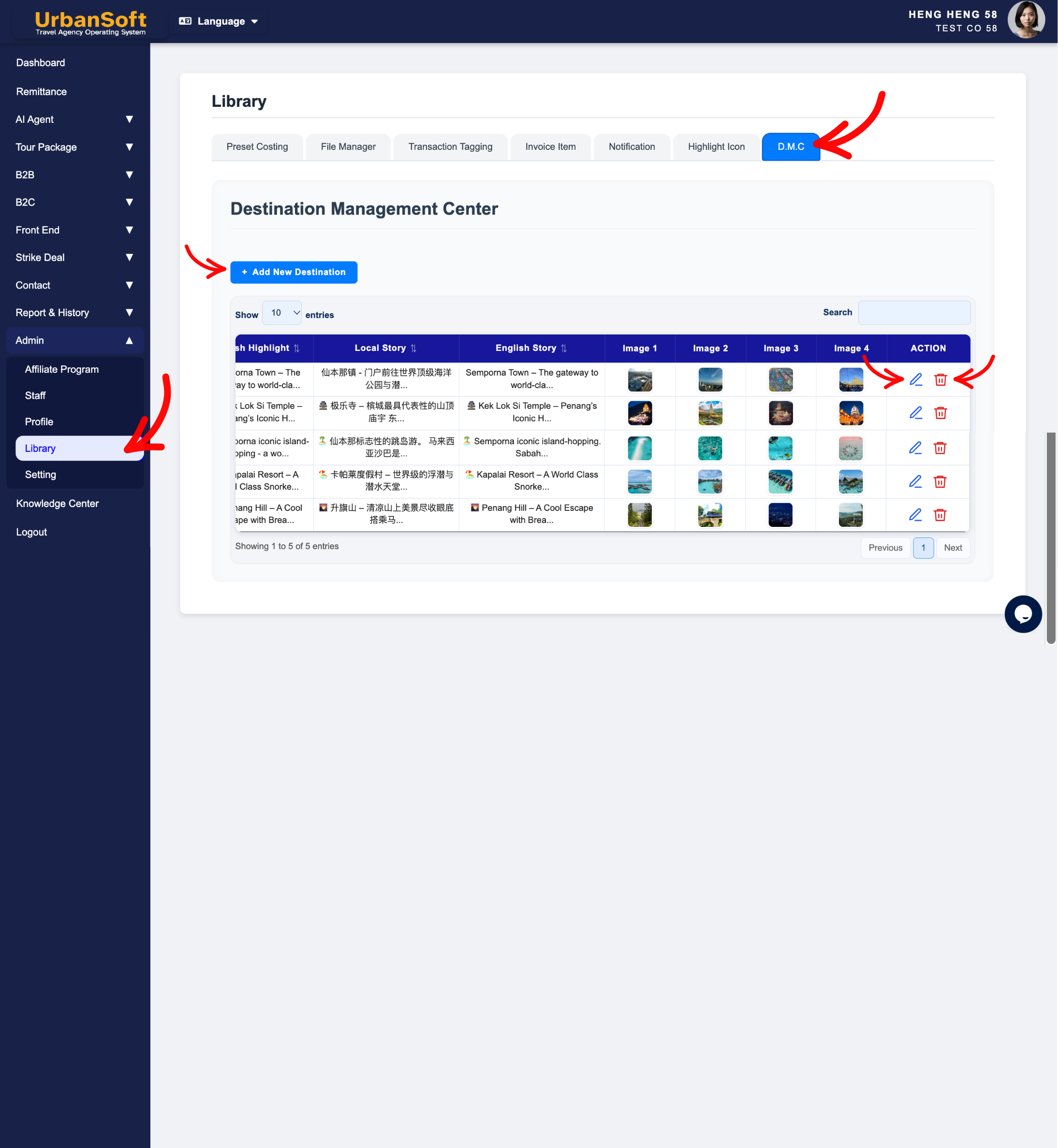
The Admin > Library > D.M.C (Destination Management Center) tab in UrbanSoft serves as a centralized content repository and destination knowledge base. It allows travel agencies to pre-build and store standardized bilingual descriptions, bulleted itinerary steps, high-impact highlight selling points, rich historical background stories, and high-resolution images for attractions, destinations, and local activities. Once stored in the DMC library, sales planners can instantly insert these pre-built destination modules into tour itineraries and customer proposals with a single click.
What Can I Do?
You can build and manage your agency's central destination content repository using the following key functions:
-
Pre-Build Standardized Destination Modules: Create reusable attraction and landmark profiles with structured bilingual titles, activity steps, selling highlights, and background lore.
-
Upload High-Resolution Destination Media: Attach up to 4 high-resolution images (
900 x 900 px) per destination entry directly from your computer or select them from the File Manager. -
Streamline Itinerary Assembly: Allow sales planners and tour designers to auto-fill rich attraction details into tour packages without manual re-typing.
-
Maintain Content Quality: Edit, update, or remove existing DMC entries to keep destination information accurate and engaging across client proposals.
Field Definitions & Operational Guidance
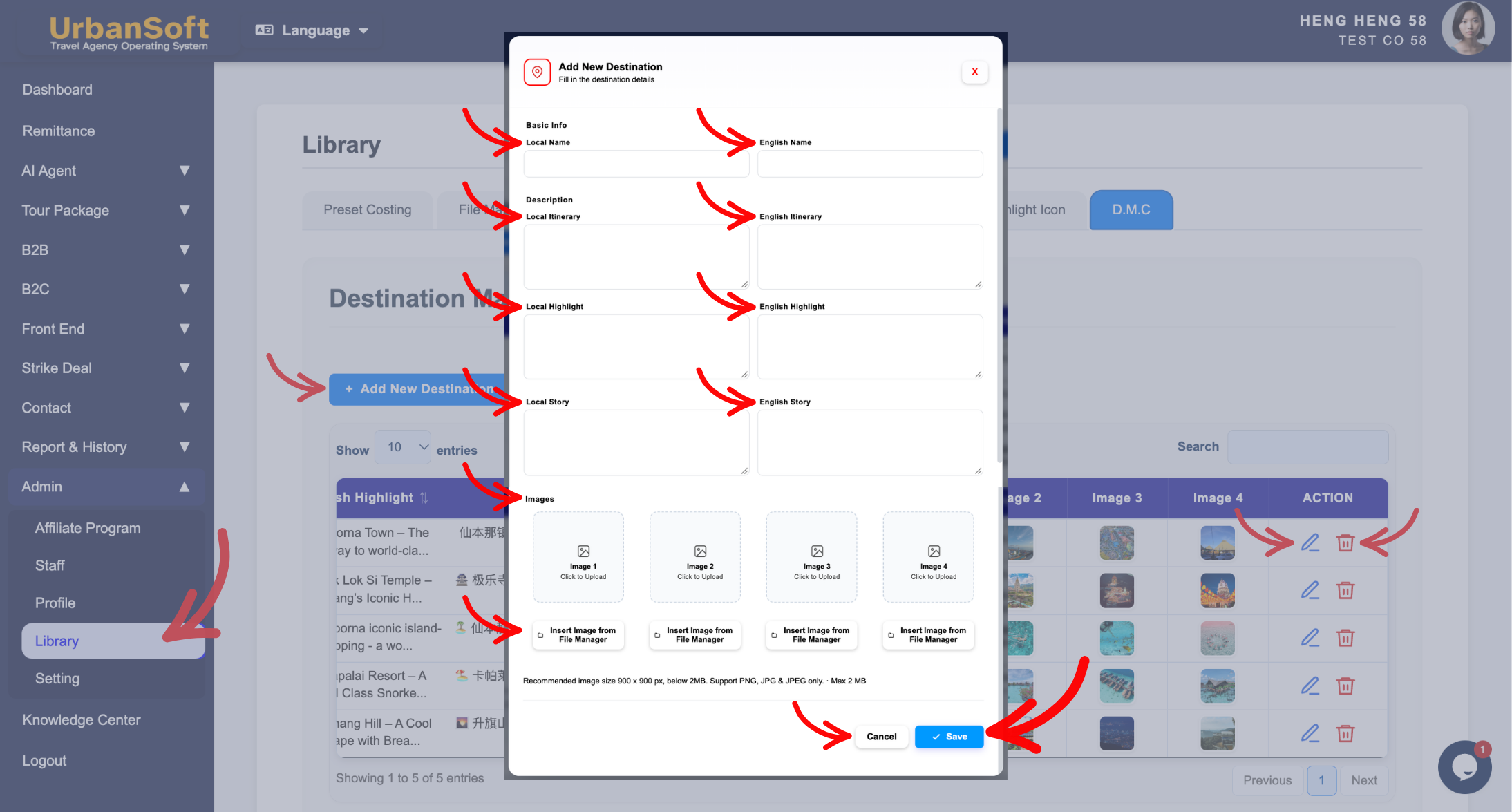
1. Basic Info
-
Local Name: Enter a concise, official local or regional name for the attraction, activity, or destination (e.g.,
"升旗山缆车"or"九寨沟国家公园"). -
English Name: Enter the short, official English title for the attraction, activity, or landmark (e.g.,
"Penang Hill Funicular Railway"or"Jiuzhaigou National Park").
2. Description Rules
-
Local Itinerary: Enter concise, bullet-pointed activity descriptions in the local language outlining what happens during the visit and what services or tickets are included (e.g.,
"游览升旗山(包含全程来回缆车票)• 游览升旗山生态公园(含入门票)"). -
English Itinerary: Enter concise, bullet-pointed daily activity steps in English explaining the visit sequence and inclusions (e.g.,
"Visit Penang Hill (includes round-trip funicular ticket) • Explore The Habitat Penang Hill (includes entrance ticket)"). -
Local Highlight: Enter 2 to 3 punchy, high-impact selling points in the local language to capture buyer attention in proposals (e.g.,
"亚洲最古老缆车系统 • 833米高空俯瞰乔治市全景"). -
English Highlight: Enter 2 to 3 concise, impactful highlights in English emphasizing the top features of the attraction (e.g.,
"Asia's oldest funicular railway system • Panoramic 360-degree views of George Town at 833m above sea level"). -
Local Story: Enter rich historical, cultural, or storytelling background text in the local language to enhance buyer travel proposals (e.g.,
"升旗山建于1923年,在英殖民时期曾是著名的避暑胜地,拥有丰富的热带雨林生态与百年历史建筑..."). -
English Story: Enter engaging background history, cultural lore, or narrative insights in English to add depth and value to client itinerary proposals (e.g.,
"Built in 1923 during the British colonial era, Penang Hill served as a cool hill station retreat. Today, it stands as a UNESCO Biosphere Reserve rich in biodiversity...").
3. Image Uploads & Entry Management
-
Upload Images: Attach up to 4 images per entry (
900 x 900 px, PNG/JPG/JPEG under 2MB) by direct upload or selecting from the system File Manager. -
Save: Click Save to add all destination fields and uploaded media to your system repository.
-
Manage Entries: Use inline action buttons (Edit or Delete) to modify existing destination profiles or remove obsolete entries from the DMC index table.
Example
When creating a reusable DMC profile for a popular landmark:
-
Navigate to Admin > Library > D.M.C and click + Add New Destination.
-
Under Basic Info, enter Local Name:
"升旗山缆车"and English Name:"Penang Hill Funicular Railway". -
In Description, enter concise bilingual itinerary steps, 2–3 selling highlights, and a rich historical story for both English and Local fields.
-
Upload 4 high-resolution photo assets (
900 x 900 px) showcasing the cable car and summit views, then click Save. Sales planners can now insert this complete landmark card directly into any Penang tour package itinerary.
Important Notes
-
Storing rich bilingual content and stories in
Admin > Library > D.M.Callows sales staff to output professional, high-converting itineraries in seconds without repetitive writing. -
Updating a DMC entry in the Library refreshes the master repository for future package builds without altering already published historical itineraries.
Different Angles: Same Stories, Same Content, New Perspective
- What basic info, bilingual itineraries, selling highlights, cultural stories, image specs, and entry controls make up the Admin > Library > D.M.C tab in UrbanSoft?
Same Folder Articles
Related Articles
-
 What information should be include in the "Admin > Library > Preset Costing" tab?
-
What information should be include in the "Admin > Library > File Manager" tab?
-
What information should be include in the "Admin > Library > Highlight Icon" tab?
-
What information should be include in the "Admin > Setting > Notice" tab?
-
How to set up my "Company Profile"?
