.gif)
.gif)
.gif)

 What information should be include in the "Admin > Setting > Notice" tab?
The Admin > Setting > Notice tab in UrbanSoft serves as the central template manager for standard company disclosures, package selling points, price inclusions/exclusions, meal policies, and trading terms. Pre-configuring these master text blocks ensures operational consistency across your agency, as the templates auto-populate into newly created tour packages, client proposals, and B2B/B2C quotations while retaining full per-package editability.
What Can I Do?
You can establish and manage your master documentation templates using the following key administrative functions:
-
Establish Core Package Highlights: Define default selling points and core features that auto-load into new package drafts.
-
Configure Universal Travel Notices: Store standardized booking disclaimers, passport/visa rules, and safety protocols.
-
Define Price Inclusion & Exclusion Templates: Standardize default lists of covered and non-covered services across tour proposals.
-
Set Meal Policy Disclaimers: Outline standard dining upgrade rates, dietary surcharges, and festive meal rules.
-
Manage Dual-Tier Terms & Conditions: Maintain separate, dedicated terms and conditions for B2B travel agency clients and direct B2C retail buyers.
Field Definitions & Operational Guidance
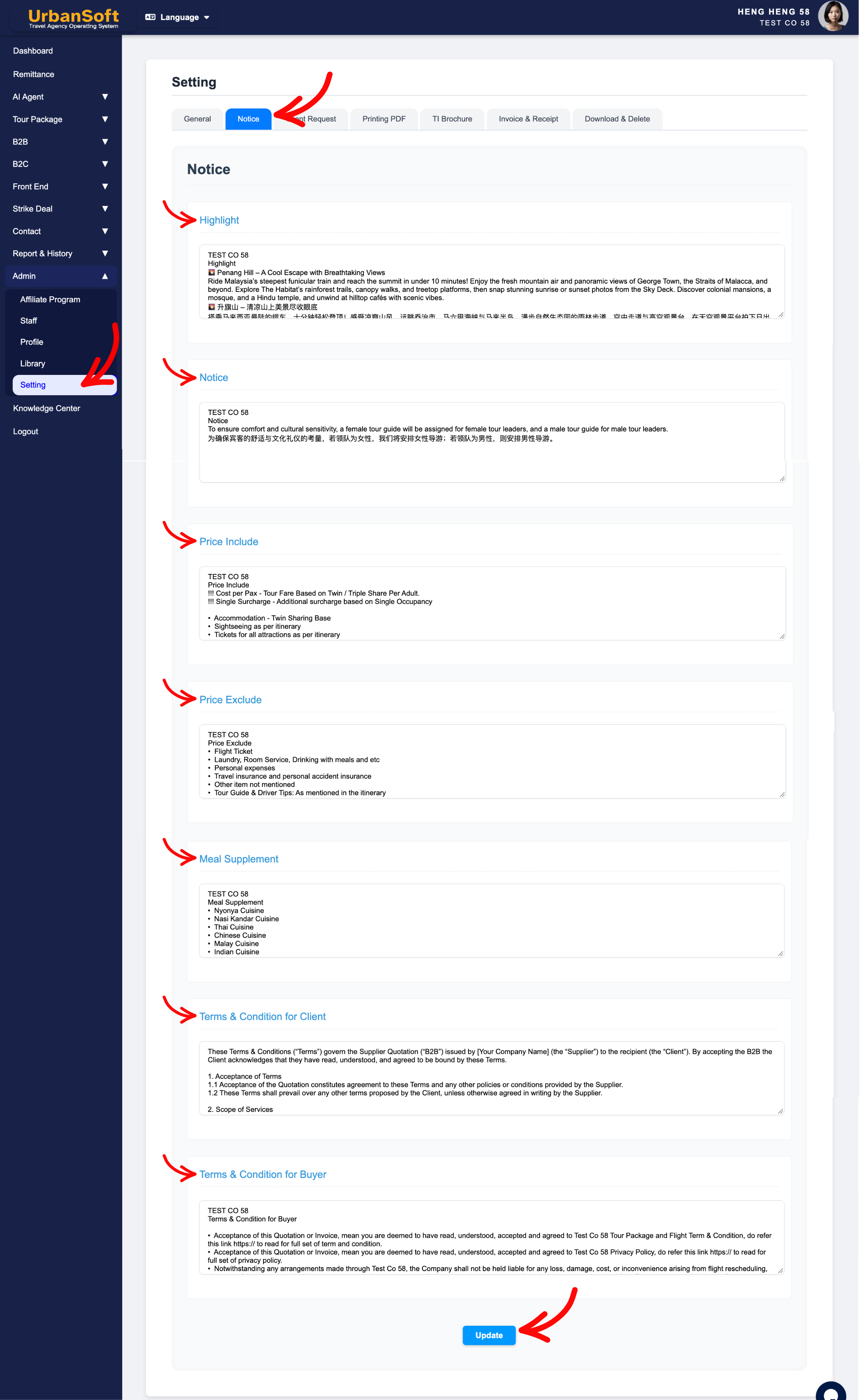
1. Selling Points & General Travel Disclaimers
-
Highlight: Enter your company's standard selling points or core value propositions that auto-populate when creating a new tour package. It serves as a "showcase" for the product's selling points. Designed to showcase the itinerary's absolute highlights and signature experiences, this section uses concise, compelling copy to create an immediate visual impact and spark a desire to book; it is ideally placed on the cover page or at the very beginning of the itinerary. (e.g.,
"Guaranteed Departure | No Hidden Charges | Handpicked 4-Star Accommodation"). -
Notice: Enter master travel disclaimers, visa reminders, passport validity requirements, general booking notes, mportant operational reminders, special instructions, safety disclosures, and travel guidelines, automatically applied to itineraries (e.g.,
"Passports must be valid for at least 6 months from travel return date. Visa requirements are the passenger's responsibility.").
2. Inclusions, Exclusions & Meal Policies
-
Price Include: Set the baseline master template listing default services covered in standard tour packages (e.g.,
"Includes: Hotel accommodation, daily breakfast, private AC transport, entrance fees as per itinerary, and licensed tour guide."). -
Price Exclude: Set the baseline master template listing items not covered or expenses to be borne by the traveller in standard packages, to avoid miscommunication (e.g.,
"Excludes: Personal expenses, international airfares, travel insurance, luggage porterage, and tipping."). -
Meal Supplement: Enter standard meal upgrade policies, dietary surcharges, or mandatory festive meal terms. (e.g.,
"Optional Halal / Vegetarian meal upgrade available upon request at USD 10/pax/day."). Additional dining details allow you to specify restaurant names, cuisine styles, and local signature dishes, as well as optional upgrades, associated surcharges, special dietary requirements, and unique dining experiences. This provides customers with a clear understanding of these value-added culinary options and any holiday meal supplements (e.g., "Lobster & Seafood Upgrade: +USD 25/person," "Halal Meal Surcharge: +USD 10/person/day," or "Mandatory Christmas Eve Dinner Surcharge: +USD 50/person"). Clearly listing costs for optional upgrades or mandatory holiday meal supplements facilitates customer understanding and streamlines internal pricing operations.
3. Trade & Customer Terms & Conditions
-
Terms & Condition for Client: Enter default B2B trade terms, credit payment periods, cancellation windows, agent commissions, booking conditions, allotment rules, and agency rules applicable to travel agents and wholesale clients (e.g.,
"Full payment due 14 days prior to group arrival. B2B commissions and net fares are subject to confidential agency agreements."). -
Terms & Condition for Buyer: Enter default deposit requirements, payment schedules, cancellation fee structures, refund policies, travel rules and liability disclaimers for direct B2C retail buyers (e.g.,
"30% deposit required upon booking confirmation. Cancellations within 14 days of departure are non-refundable.").
4. Status Verification & Saving
-
Complete All Field: Displays a status summary verifying that the entire set of Notice settings—including Highlight, Notice, Price Include, Price Exclude, Meal Supplement, Terms & Condition for Client, and Terms & Condition for Buyer—has been fully populated.
-
Update: Click this action button to save all templates, fields, and configurations for the Notice section.
Example
When establishing standard operational notice templates for a travel agency:
-
Navigate to Admin > Setting > Notice and enter Highlight: "Professional Local Guide | Deluxe Private Transportation".
-
Configure Price Include with standard hotel and transfer inclusions, and Price Exclude with personal expenses and insurance.
-
Define Terms & Condition for Client (B2B terms) with a 14-day payment window for agent partners, and Terms & Condition for Buyer (B2C terms) with a 30% deposit rule for retail travelers.
-
Verify the Complete All Field indicator and click Update to save the global templates.
Important Notes
-
Content configured in
Admin > Setting > Noticeserves as a master template library that automatically pre-populates into new tour packages to save time. -
Modifying text inside
Admin > Setting > Noticeupdates future tour packages only—it does not alter existing tour packages or previously published quotations in your database. -
Individual tour itineraries can still be manually edited, or customized to override these default notices whenever necessary.
-
Keeping terms and pricing coverage clear and up-to-date, helps prevent booking disputes with both buyers and travel agents.
Different Angles: Same Stories, Same Content, New Perspective
- What standard text blocks, travel notices, inclusions/exclusions, meal policies, and B2B/B2C terms make up the Admin > Setting > Notice tab in UrbanSoft?
-
How do I set up default price inclusions, exclusions, and booking terms for my tour packages in UrbanSoft?
-
How to customize default terms and conditions for B2B vs. B2C quotes?
-
How do default notices apply when creating a new tour package?
-
How to set default package notice terms in Admin settings?
Same Folder Articles
Related Articles
-
 What information should be include in the "Admin > Setting > General" tab?
-
What information should be include in the "Admin > Setting > Client Request" tab?
-
What information should be include in the "Admin > Setting > Printing PDF" tab?
-
What information should be include in the "Admin > Setting > TI Brochure" tab?
-
What information should be include in the "Admin > Setting > Invoice & Receipt" tab?
