.gif)
.gif)
.gif)

 What information should be include in the "Admin > Library > Notification" tab?
The Admin > Library > Notification tab (specifically for Strike Deal operations) in UrbanSoft serves as an automated system alert and reminder configuration module. It enables travel agencies to manage automated email notifications for upcoming Strike Deal due dates, payment milestones, and contract fulfillment deadlines. By pre-configuring milestone alerts, the system ensures that sales, operations, and finance teams are notified in advance before confirmed deals reach their critical expiration or payment due dates.
What Can I Do?
You can establish and manage automated transaction milestone alerts using the following key functions:
-
Configure Staged Due Date Milestones: Set up to 4 distinct notification time triggers (e.g., 30, 20, 10, and 5 days before the deal due date) to track pending settlement deadlines systematically.
-
Specify Notification Sender Email: Designate the official corporate email address responsible for dispatching automated alert messages.
-
Define Email Dispatch Frequency: Control the cadence and schedule at which automated reminder notifications are generated and delivered.
-
Save & Apply Global Alert Rules: Save progress and apply automated reminder workflows globally across all active Strike Deal records.
Field Definitions & Operational Guidance
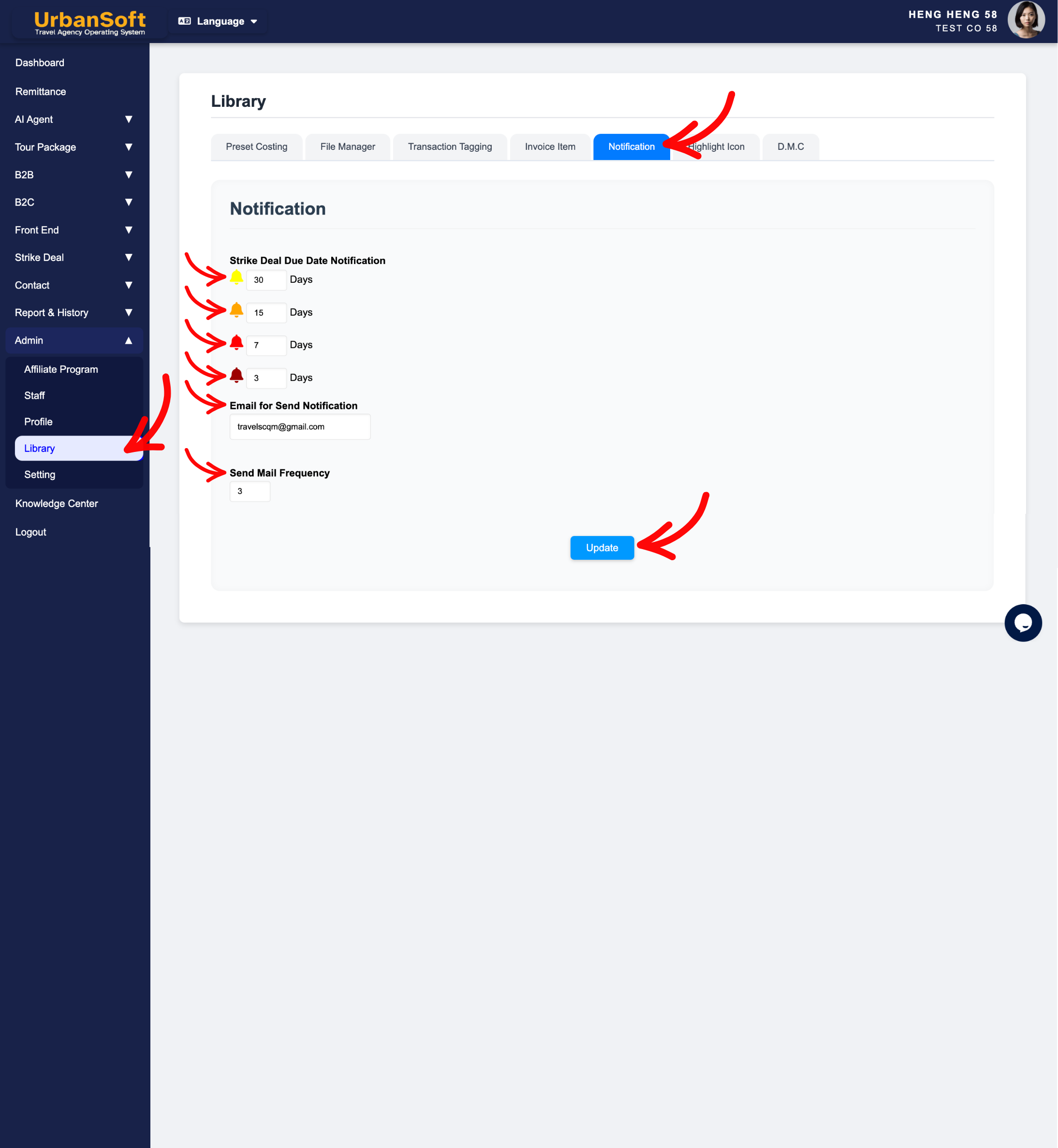
1. Strike Deal Notification Setup Rules
-
Strike Deal Due Date Notification: Configure up to 4 notification milestones counted prior to the deal due date (e.g., setting milestone triggers at
"30 Days","20 Days","10 Days", and"5 Days"before due date). -
Email for Send Notification: Enter the designated internal or administrative email address used to send out system alert notifications (e.g.,
"alerts@company.com"or"operations@company.com"). -
Send Mail Frequency: Set the automated dispatch cadence or daily/weekly limit (e.g., 3 or 4) for email alerts to ensure timely reminders without causing inbox overload.
2. Status Verification & Saving
-
Update: Click this action button to save all progress, fields, and configurations for the Notification (Strike Deal) section.
Example
When setting up automated deal tracking alerts for a travel agency's booking department:
-
Navigate to Admin > Library > Notification.
-
Under Strike Deal Due Date Notification, enter 4 notification milestone triggers:
"30 Days","20 Days","10 Days", and"5 Days"before the due date. -
In Email for Send Notification, enter
"finance@company.com". -
Configure the Send Mail Frequency as 3 and click Update to activate global automated deal reminders.
Important Notes
-
Setting up multi-tiered milestone alerts (such as 30, 20, 10, and 5 days) ensures that operations and accounting staff receive timely advance warnings, preventing missed vendor payments or deal cancellations.
-
Updates made in
Admin > Library > Notificationautomatically apply to all active and future Strike Deal workflows across the platform.
Different Angles: Same Stories, Same Content, New Perspective
- What milestone triggers, sender email inputs, dispatch frequencies, and saving controls make up the Admin > Library > Notification tab in UrbanSoft?
Same Folder Articles
Related Articles
-
 What information should be include in the "Admin > Library > Preset Costing" tab?
-
What information should be include in the "Admin > Library > Transaction Tagging" tab?
-
What information should be include in the "Admin > Library > Invoice Item" tab?
-
What information should be include in the "Admin > Setting > Notice" tab?
-
How to set up my "Company Profile"?
