.gif)
.gif)
.gif)

 What information should be include in the "Tour Package Basic Information" tab?
The Tour Package Basic Information section serves as the core foundation for creating and organizing any tour itinerary in UrbanSoft. It captures all primary administrative, operational, and geographical details, such as tour codes, departure gateways, duration, and system status. Accurately filling out this section ensures seamless package tracking, correct daily itinerary generation, and efficient searching across your company's database.
What Can I Do?
You can establish and configure a new tour package using the following key functions:
-
Set Unique Identifiers & Titles: Define your custom company tour code and an attractive package name for clients.
-
Manage Package Operational Status: Track editing progress by assigning responsible staff members and updating status from draft to completed.
-
Define Destinations & Gateways: Specify arrival/departure ports, start/end cities, and target countries, states/province, or regions.
-
Control Itinerary Structure: Set the total days and nights to automatically generate the correct number of daily itinerary rows.
-
Apply System Tags & Categorization: Attach searchable tags and define travel styles for easy filtering and system database organization.
Field Definitions & Operational Guidance
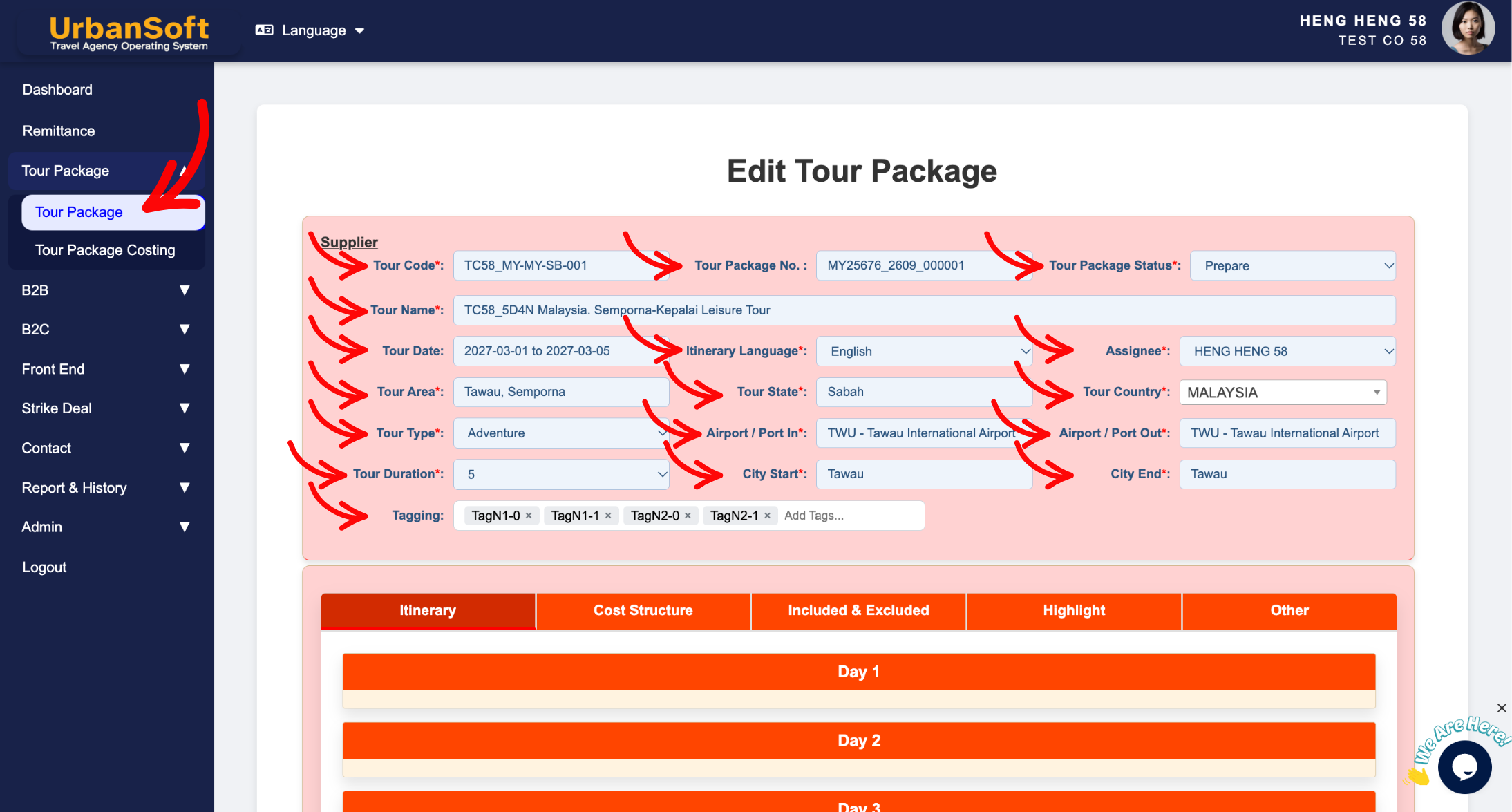
1. Administrative & Identification Details
-
Tour Code*: Enter your internal company reference code. There is no fixed format; you may use numbers, letters, dates, or a combination (e.g.,
"MY-PG-0403-002"or"MYABC-8D-Chongqing-20260310"). -
Tour Name*: Enter the title of your trip following your company's naming convention (e.g.,
"5D4N Highlights of Penang & Langkawi"). Keep it clear, professional, and attractive for clients. -
Tour Package No.*: Automatically generated by UrbanSoft to provide a unique tracking series number. No input is required.
-
Tour Package Status*: Select
"Prepare"while drafting or editing details; change to"Completed"once the itinerary, pricing, and settings are finalized and ready for publishing. -
Assignee*: Select the Person in Charge (PIC) or team member responsible for creating and managing this specific tour package.
-
Itinerary Language*: Choose the primary language for the itinerary (e.g., English, Traditional Chinese). Note: Multi-language availability depends on your UrbanSoft plan tier.
-
Tour Date: Specify the applicable date range or valid departure period for this package. This field can be left empty if the departure date is not fixed yet.
2. Destination & Geographical Coverage
-
Tour Area*: Enter the city, region, or zone where the tour takes place (e.g.,
"Southeast Penang"or"Georgetown, Butterworth"). Multiple areas can be entered. -
Tour State*: Enter the specific state or province (e.g.,
"Penang","Sabah", or"Semporna"). Multiple states can be selected. -
Tour Country*: Select the destination country (e.g.,
"Malaysia"or"Japan").
3. Travel Style, Gateways & Logistics
-
Tour Type*: Select the travel style or category that fits best (e.g.,
"Sightseeing","Adventure","Luxury", or"Cruise"). -
Tour Duration*: Select the total number of days and nights (e.g.,
"4 Days 3 Nights"). This setting directly determines the number of day-by-day itinerary breakdown rows generated by the system. -
Airport / Port In*: Specify the primary arrival gateway code or gateway name (e.g.,
"PEN - Penang International Airport"or"Port Klang"). -
Airport / Port Out*: Specify the primary departure gateway code or gateway name (e.g.,
"LGK - Langkawi International Airport"or"Johor Baharu Land Port"). -
City Start*: Enter the starting city where guests begin their tour (e.g.,
"George Town"). -
City End*: Enter the final city where the tour ends (e.g.,
"Kuah"or"Kuala Lumpur").
4. Tagging & Final Submission
-
Tagging: For Growth Membership and above, attach relevant keywords or categories pre-populated from
Admin > Library > Transaction Tagging(e.g.,"Honeymoon","Family Friendly", or"UNESCO Heritage") to simplify filtering and cross-referencing within your database. -
Add Tour Package: Click this action button at the bottom once all mandatory fields are completed to create and save your new tour package. or
-
Complete All Field: Displays a status summary verifying that administrative, identification details, destination & geographical coverage, travel style, gateways, logistics, tagging and final submission have been fully populated.
-
Update: Click to save all progress, fields, and pricing configurations for the basic information section.
Example
When creating a new 5-Day Penang & Langkawi Island Hopping Package:
-
Input Tour Code:
"MY-PG-2026-001"and Tour Name: "5D4N Highlights of Penang & Langkawi Island Hopping". -
Set Tour Status to
"Prepare", assign the package to yourself under Assignee, and select Itinerary Language as "English". -
Choose Tour Country: "Malaysia", Tour State: "Penang, Kedah", and Tour Area: "Georgetown, Langkawi".
-
Select Tour Duration: "5 Days 4 Nights", set Airport / Port In: "PEN - Penang International Airport", and Airport / Port Out: "LGK - Langkawi International Airport".
-
Select Tagging options like
"Island Tour"and"UNESCO Heritage", then click Add Tour Package to generate the daily itinerary framework.
Important Notes
-
Setting the correct Tour Duration is crucial, as UrbanSoft relies on this setting to automatically build the correct number of daily itinerary rows.
-
Mandatory fields marked with an asterisk (
*) must be filled in before the system allows you to click Add Tour Package or Update. -
Keep Tour Package Status as
"Prepare"while building pricing and itineraries to prevent incomplete draft packages from showing up in sales reports or public channels.
Different Angles: Same Stories, Same Content, New Perspective
- What basic information, departure details, geographical coverage, and operational fields are required when setting up a new tour package in UrbanSoft?
Same Folder Articles
-
 How to create "New Tour Package" manually?
-
How to create "New Tour Package", with "Ai Insert Tour Package" feature?
-
How to edit or update an existing "Tour Package"?
-
How to duplicate assisting "Tour Package"?
-
How to use "Ai Translate" to translate assisting tour package to another new other language tour package?
Related Articles
-
What information should be include in the "Highlight" tab?
-
What should be filled out in the "Costing Table" field in Cost Structure section?
-
What should be filled out in the "Surcharges for Public Holiday & Peak Seasons" field in Setting > General and Cost Structure section?
-
What information should be include in the "Cost Structure" tab?
-
Relationship between "Costing Currency, Quote Currency, Current Rate, and Fixed Rate" in Setting > General and Tour Package?
