.gif)
.gif)
.gif)

 Relationship between "Costing Currency, Quote Currency, Current Rate, and Fixed Rate" in Setting > General and Tour Package?
The relationship between Costing Currency, Quote Currency, Current Rate, and Fixed Rate in an UrbanSoft tour package, forms the core multi-currency pricing mechanism of the platform. It dictates how other country supplier costs, sourced in various foreign currencies are converted, into a standardized internal base currency (Costing Currency), and subsequently transformed into the final selling currency displayed to clients (Quote Currency). By default, UrbanSoft utilizes dynamic, live market exchange rates (Current Rate) for currency conversions. However, tour operators can stabilize prices, and protect profit margins against currency volatility, by manually specifying a custom exchange rate (Fix Rate) and enabling the Use Fix Rate toggle.
What Can I Do?
You can manage multi-currency pricing, conversion logic, and exchange rate locks using the following configuration tools:
-
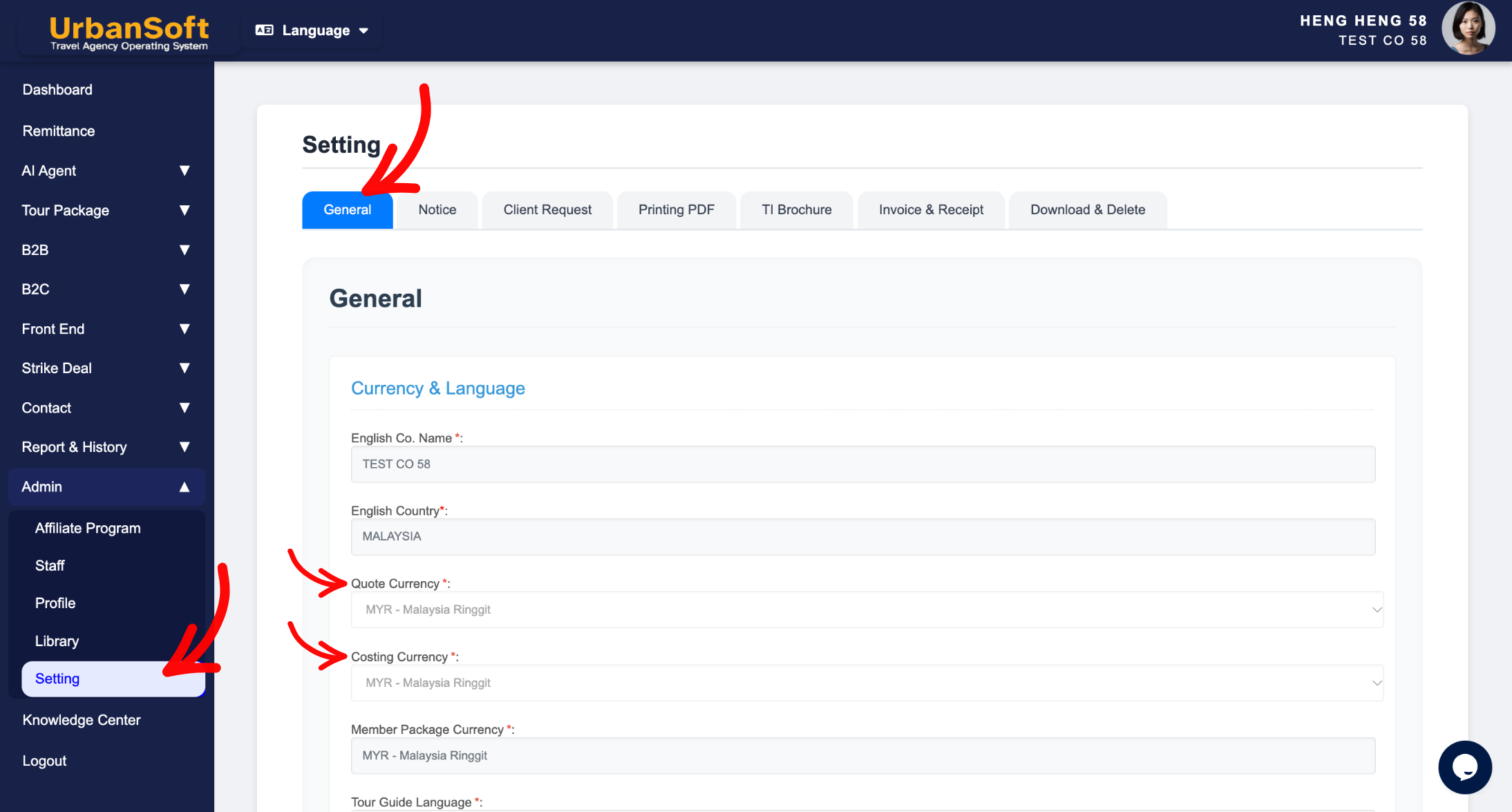
Set Internal Baseline Costing Currency: Utilize a single Costing Currency to aggregate supplier expenses from different global vendors into a unified internal cost structure (defaulted from
Admin > Setting > General, e.g.,MYR,USDorSGD, contact customer care if currency options need updating). -
Select Client-Facing Quote Currency: Set the primary selling currency displayed on customer quotations and proposals (defaulted from
Admin > Setting > General, e.g.,MYR、USDorSGD, but customizable per package). -
Monitor Live System Exchange Rates: View real-time market exchange rates (Current Rate) automatically fetched by the system for dynamic conversions.
-
Lock Exchange Rates for Margin Protection: Enter a custom exchange rate (Fix Rate) and check Use Fix Rate to enforce price stability on client quotes regardless of real-time market fluctuations.
Field Definitions & Operational Roles
-
Costing Currency*: The standard baseline currency used internally for aggregating supplier costs across different countries and currencies into a single cost structure (defaulted from
Admin > Setting > General, e.g.,MYR,USD, orSGD, contact customer care if currency options need updating). -
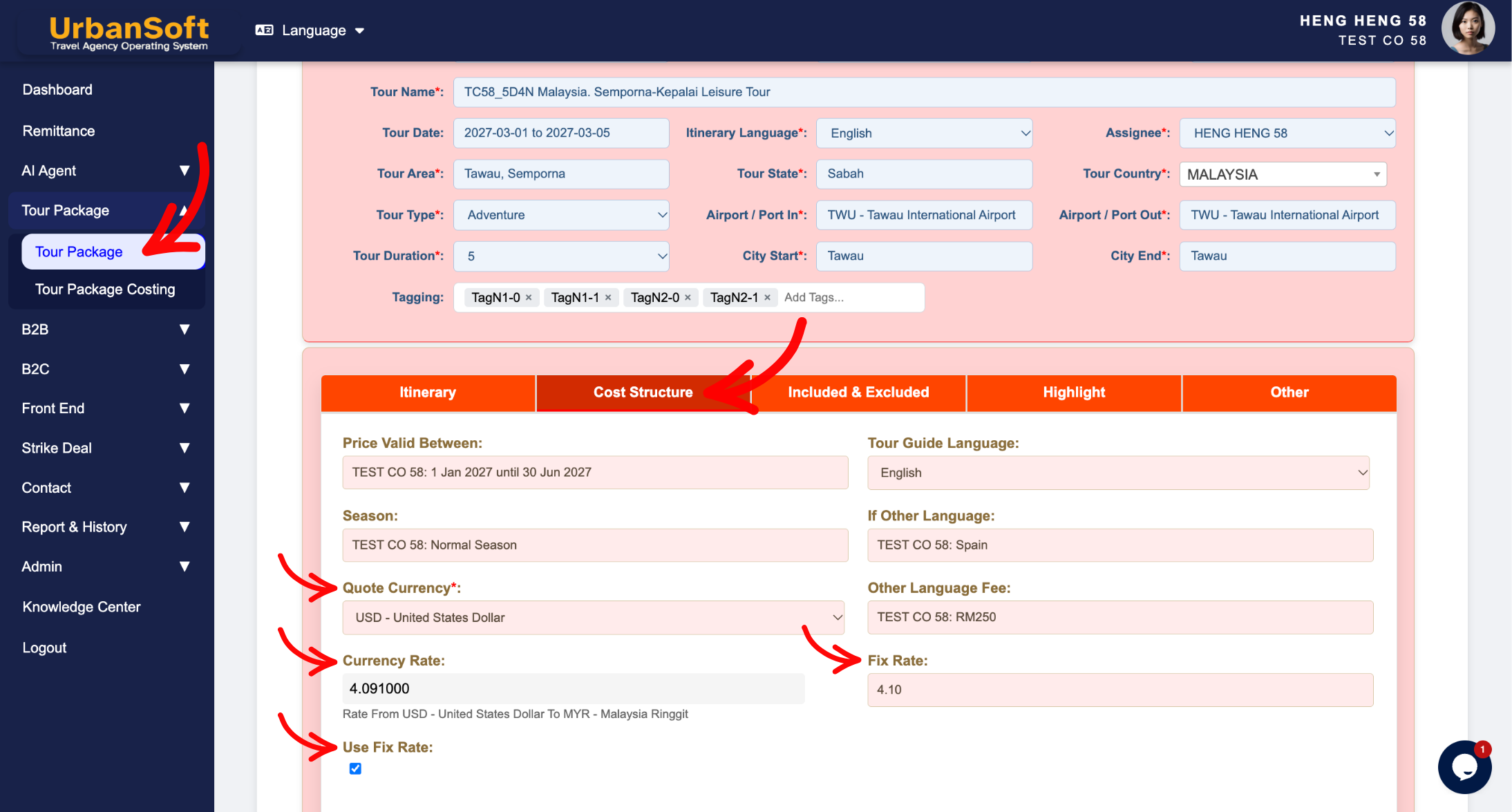
Quote Currency*: The base selling currency used for calculating and displaying tour package prices on client-facing quotations (defaulted from
Admin > Setting > General, e.g.,MYR,USD, orSGD, but editable per package). -
Current Rate: Displays the active real-time system exchange rate, used to convert foreign supplier costs into final base costing, or convert final costing into the selling/quote currency automatically.
-
Fix Rate: Allows manual input of a fixed exchange rate to override fluctuating market rates.
-
Use Fix Rate: Toggle option to lock in and enforce the custom fixed rate, for supplier costing, client quotations and profit margin stability.
Example
When building a tour package that includes Japanese hotel costs in JPY and European ground transfers in EUR for a Malaysian client paying in MYR:
-
Costing Currency aggregates internal costs (e.g., converting JPY and EUR into MYR base costs).
-
Quote Currency is set to
MYRfor the final quotation. -
If live market rates are fluctuating, the operator enters a Fix Rate (e.g.,
1 EUR = 4.85 MYR) and toggles Use Fix Rate. -
The system locks this exchange rate, ensuring the final quoted price to the client remains unchanged despite foreign currency market shifts.
Important Notes
-
Default Quote Currency pre-populates from
Admin > Setting > Generalduring new package creation, saving time while permitting package-level customization. -
Overriding the exchange rate using Fix Rate and Use Fix Rate applies strictly to the current tour package record—it does not alter system-wide default rates or impact existing packages.
-
Locking exchange rates protects tour operators from currency risk between quote issuance and customer booking confirmation.
Different Angles: Same Stories, Same Content, New Perspective
- How do Costing Currency, Quote Currency, Current Rate, and Fixed Rate interact to handle multi-currency pricing and rate locking in UrbanSoft tour packages?
Same Folder Articles
Related Articles
-
 What should be filled out in the "Surcharges for Public Holiday & Peak Seasons" field in Setting > General and Cost Structure section?
-
What should be filled out in the "Other Costing Remark" field in Setting > General and Cost Structure section?
-
What should be filled out in the "Policy for kids and adult with extra bed" field in Setting > General and Cost Structure section?
-
What information should be include in the "Included & Excluded" tab?
-
What should be filled out in the "Price Included" field in Setting > Notice and Included & Excluded section?
