.gif)
.gif)
.gif)

 What should be filled out in the "Surcharges for Public Holiday & Peak Seasons" field in Setting > General and Cost Structure section?
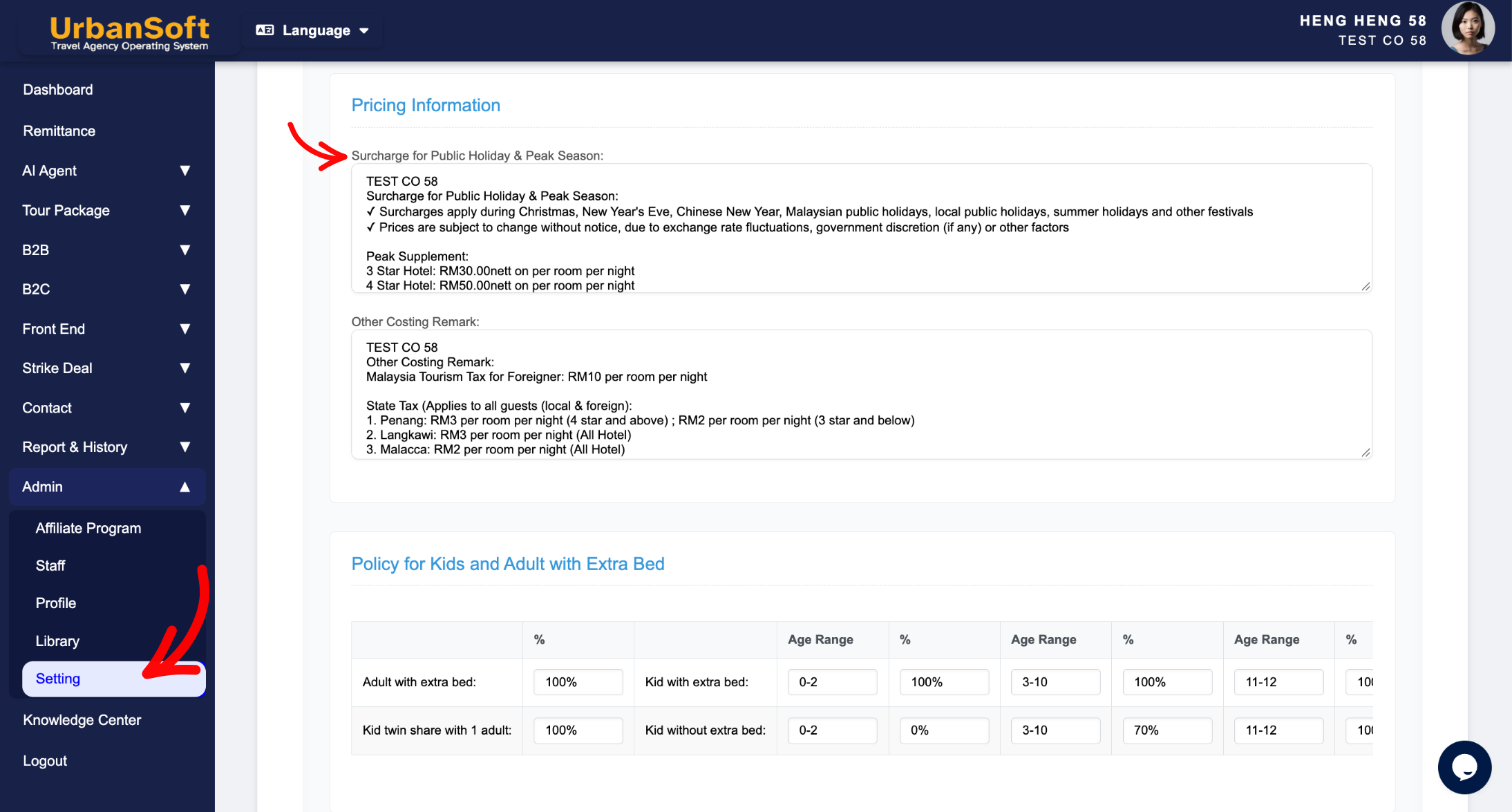
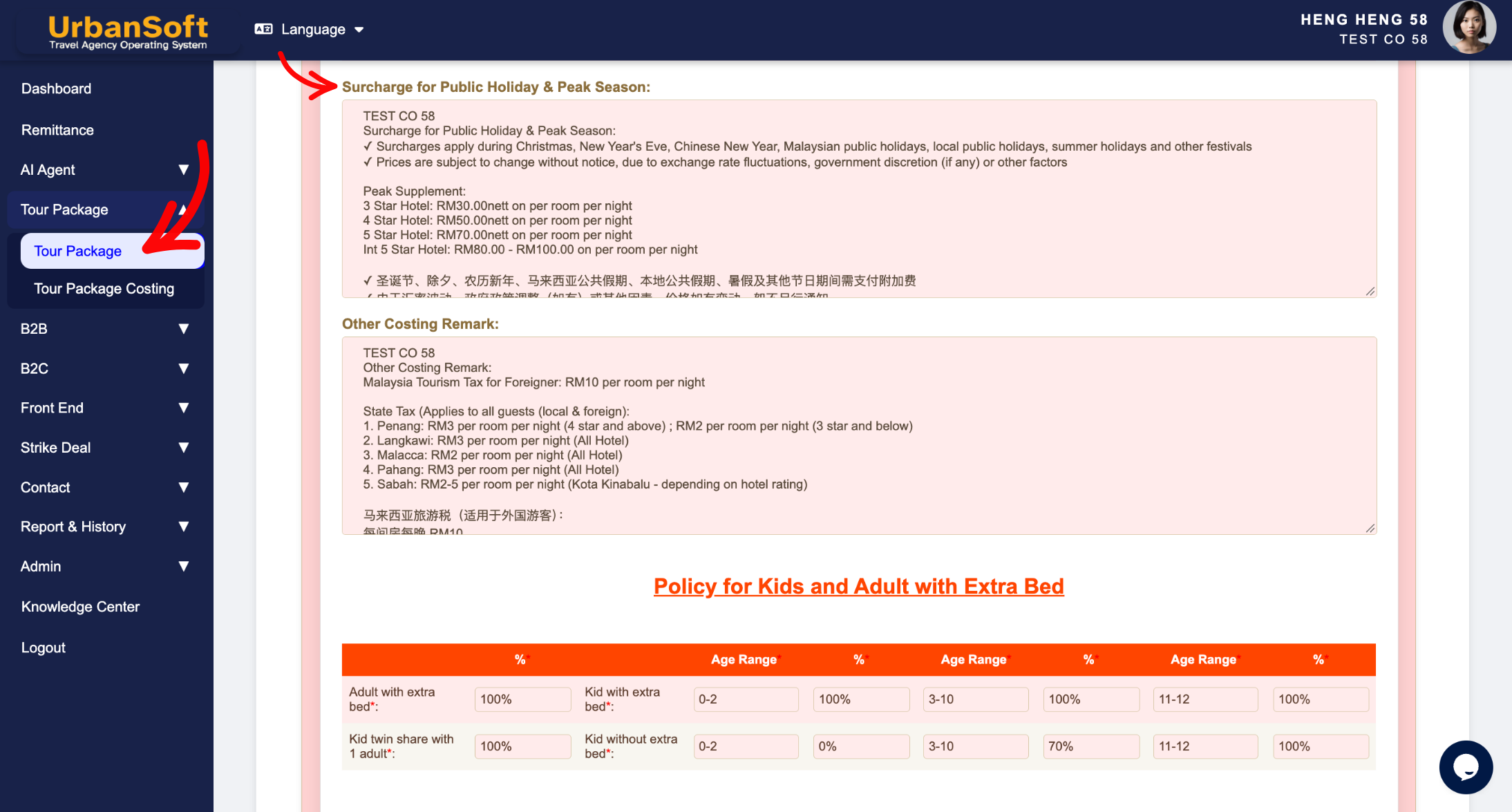
The Surcharges for Public Holiday & Peak Seasons field in the Cost Structure section of an UrbanSoft tour package captures mandatory extra fees, or percentage markups applied during high-demand dates, long weekends, and festive periods. Default surcharge rules and terms are pre-populated from Admin > Setting > General and can be customized directly for specific packages. Keeping holiday and peak season fees in this dedicated field ensures accurate package costing and clear price breakdowns without confusing general/other cost remarks.
What Can I Do?
You can define peak date price adjustments and manage, default surcharge policies using the following options:
-
Specify Mandatory Peak Date Fees: Define fixed surcharge amounts or percentage markups applicable during peak travel seasons, school holidays, or public holidays.
-
Maintain Dedicated Costing Categories: Keep peak season surcharges separate from general tax or cost disclaimers (which belong in the "Other Costing Remark" field).
-
Set & Manage Global Surcharge Defaults: Pre-populate standard company holiday surcharge terms under
Admin > Setting > Generalfor quick application across new packages. -
Customize per Tour Package: Override or adjust peak surcharge rates on specific packages, to match vendor rate sheets or destination-specific holiday surcharges, without affecting existing database records.
Field Definitions & Ideal Inputs
-
Surcharges for Public Holiday & Peak Seasons: Mandatory extra charges applicable during public holidays or peak travel dates (pre-populated from
Admin > Setting > General).-
Ideal Inputs: Specific holiday markup terms or daily surcharge amounts (e.g.,
"USD 30 per person per night for Christmas & New Year Peak Season (24 Dec - 02 Jan)","MYR 100 per room/night during Hari Raya & Chinese New Year", or"15% surcharge applicable on national public holidays").
-
Example
For a regional tour package, you can set the global default in Admin > Setting > General to state: "Public Holiday & Peak Season Surcharge: MYR 50 per person per night." When setting up a specific island resort package, you can customize this field to reflect hotel peak tariffs: "Surcharge of MYR 150 per room per night applies for Eve and Public Holidays (Chinese New Year, Hari Raya, Christmas, and New Year's Eve)."
Important Notes
-
Default surcharge settings configured in
Admin > Setting > Generalautomatically load when creating a new tour package, saving time and ensuring consistent pricing rules. -
Modifying the surcharge field within a specific tour package updates that package only—it does not alter the global admin defaults or modify existing packages in the system.
-
Utilizing this dedicated field ensures peak season price adjustments are correctly reflected in automatic quote calculations and customer itineraries.
Different Angles: Same Stories, Same Content, New Perspective
- How do you specify public holiday and peak season price adjustments when configuring a tour package in UrbanSoft?
Same Folder Articles
Related Articles
-
 What should be filled out in the "Other Costing Remark" field in Setting > General and Cost Structure section?
-
What should be filled out in the "Policy for kids and adult with extra bed" field in Setting > General and Cost Structure section?
-
What should be filled out in the "Notice" field in Setting > Notice and Cost Structure section?
-
What should be filled out in the "Highlight" field in Setting > Notice and Highlight section?
-
What should be filled out in the "Meal Supplement" field in Setting > Notice and Highlight section?
