.gif)
.gif)
.gif)

 What information should be include in the "Cost Structure" tab?
The Cost Structure section in UrbanSoft forms the core pricing, multi-currency, and operational parameter engine of a tour package. It compiles all financial parameters, validity dates, guide options, tiered pricing tables, surcharge rules, child and extra bed policies, operational notices, supplier quotation attachments, and system validation controls. While several parameters are pre-populated from central defaults in Admin > Setting, prices can either be entered manually or generated automatically through the Tour Package Costing module, tour operators retain complete flexibility to customize every field on a per-package basis.
What Can I Do?
You can manage the complete costing and operational framework, of your tour package using the following key functions:
-
Set Price Validity & Seasonality: Define specific validity date windows and classify pricing seasons (e.g., Low, Peak, or Super Peak).
-
Configure Tour Guide Languages: Set primary guide languages, add special language requirements, and apply daily language surcharges.
-
Manage Multi-Currency & Exchange Locks: Select selling currencies, view dynamic system exchange rates, and lock fixed custom rates to safeguard profit margins.
-
Build Tiered Group Pricing (Slots A–O): Assign pax counts, transport options, seat numbers, internal operational notes, cost per pax, single surcharges, and tipping fees across up to 15 tier slots.
-
Set Surcharges & Financial Disclaimers: Define peak season surcharges and general cost remarks/tax disclaimers.
-
Define Extra Bed & Child Policies: Set rate ratios for adults using extra beds, children sharing with 1 adult, and children traveling with or without extra beds.
-
Attach Operational Notices & Supplier Files: Display operational disclosures, upload supplier quotations, and manage attached documentation.
-
Verify System Completeness: Use completion checklists, preview PDF cost breakdowns, and save package updates securely.
Field Definitions & Operational Guidance
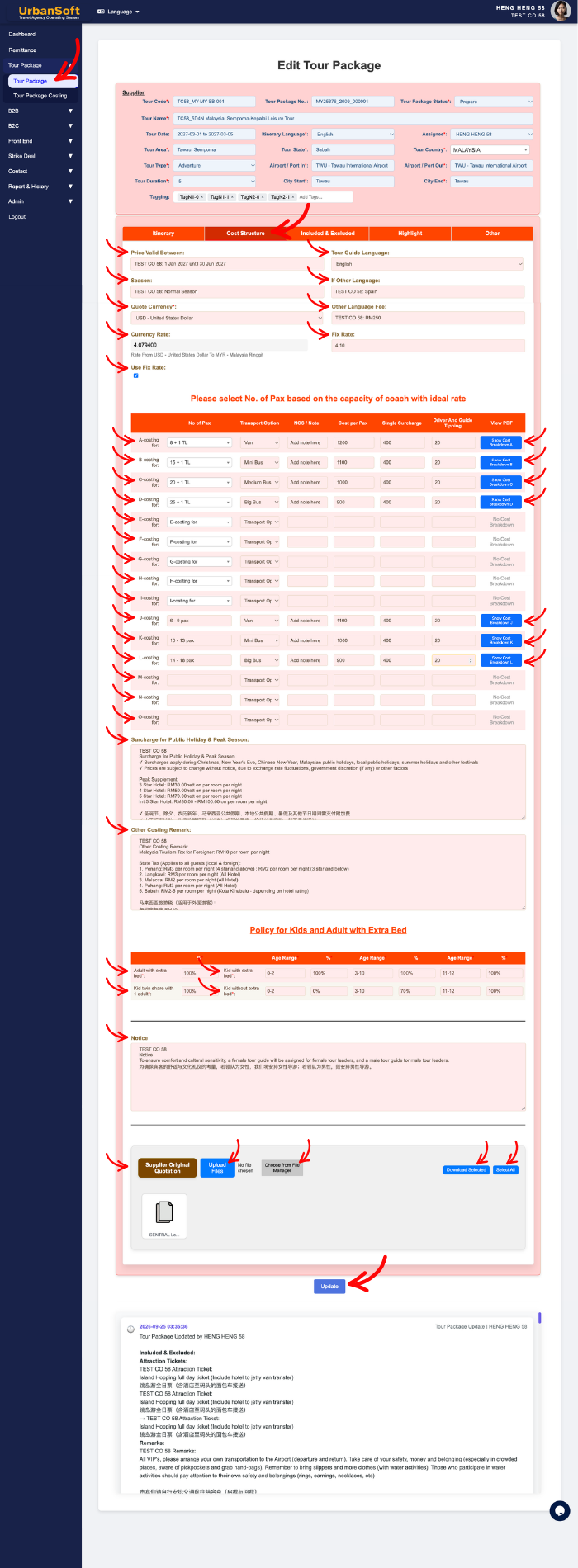
1. Validity, Seasonality & Tour Guide Settings
-
Price Valid Between: Select start and end dates defining the validity window for this pricing table (e.g.,
2026-04-01 to 2026-09-30). -
Season: Categorize the pricing season (e.g.,
Low Season,Peak Season, orSuper Peak). -
Tour Guide Language: Select the primary language for tour guide services (defaulted from
Admin > Setting > General, e.g.,EnglishorMandarin), editable per package. -
If Other Language: Specify additional requested languages (e.g.,
FrenchorJapanese). -
Other Language Fee: Enter additional daily fees or surcharges incurred for specialized or non-standard language guides.
2. Currency Controls & Exchange Rate Locking
-
Quote Currency*: Select the base selling currency used on client quotations (defaulted from
Admin > Setting > General, e.g.,MYR,USD, orSGD), editable per package. -
Currency Rate: Displays the active real-time system exchange rate, used to convert supplier costs into base costing, or base costing into selling currency.
-
Fix Rate: Allows manual entry of a fixed exchange rate to override dynamic market fluctuations.
-
Use Fix Rate: Toggle option to lock in and enforce the custom fixed rate for client quotations and profit margin stability.
3. Tiered Group Costing Table (Slots A to O)
-
Please select No. of Pax based on the capacity of coach with ideal rate: Choose group size tiers alongside matching vehicle capacities to optimize per-pax rates.
-
A-costing for until O-costing for: Represents 15 customizable pricing category slots (A through O) used to tier group sizes or transport capacities.
-
Select No of Pax: Choose or type group sizes (e.g.,
A = 6 Pax,B = 8 + 1 TL Pax,J = 7 - 10 Pax). Note: When manually typing pax numbers, insert a space after the first digit to ensure correct system formatting. -
Select Transport Option: Pick vehicle types matching group size tiers (e.g.,
Van,18-Seater VIP Coach, orBig Bus). -
NOS / Note: Enter Number of Seats (NOS) or internal operational notes regarding transport, driver allocations, or vehicle rules.
-
Cost per Pax:
-
Launch Membership and above: Can use Tour Package Costing or enter Manually. Calculated automatically via the Tour Package Costing Module (Cost + Profit) and inserted into the table (editable).
-
Starter Membership: Manually enter selling costs per traveler based on pax tiers and vehicle costs.
-
-
Single Surcharge:
-
Launch Membership and above: Can use Tour Package Costing or enter Manually. Calculated automatically via the Tour Package Costing Module (Cost + Profit) and inserted into the table (editable).
-
Starter Membership: Manually enter single supplement fees for solo travelers occupying private rooms.
-
-
Driver and Guide Tipping:
-
Launch Membership and above: Can use Tour Package Costing or enter Manually. Calculated automatically via the Tour Package Costing Module (Cost + Profit) and inserted into the table (editable).
-
Starter Membership: Manually enter suggested or required tipping amounts per pax or per day.
-
-
View costing breakdown in PDF: Click to generate and preview a comprehensive PDF sheet detailing itemized cost and profit components.
4. Surcharges, Remarks & Guest Policies
-
Surcharge for Public Holiday & Peak Season: Specify mandatory extra charges applicable during public holidays or peak travel dates (defaulted from
Admin > Setting > General), editable per package. -
Other Costing Remark: Include general pricing disclaimers, tax notes (e.g.,
"Subject to 6% SST"), and supplementary financial conditions (defaulted fromAdmin > Setting > General), editable per package. -
Policy for Kids and Adult with Extra Bed: Defines age rules, bedding setups, and pricing tiers for extra beds and child traveler categories:
-
Adult with extra bed*: Pricing percentage or fixed rate for an adult using an extra bed (defaulted from
Admin > Setting > General, e.g.,100% of Adult Rate). -
Kid twin share with 1 adult*: Rate for a child or infant sharing a twin room with 1 adult (defaulted from
Admin > Setting > General, e.g.,90% of Adult Rate). -
Kid with extra bed*: Rate for a child or infant using an extra bed in a room with parents (defaulted from
Admin > Setting > General, e.g.,75% of Adult Rate). -
Kid without extra bed*: Rate for a child or infant sharing existing bedding without an extra bed (defaulted from
Admin > Setting > General, e.g.,50% of Adult Rate). -
Multi-Kid Age Group Configuration (Up to 3 Groups): Ability to add up to 3 age groups with distinct age ranges and percentage rates.
-
5. Notices, Supplier Documentation & Validation
-
Notice: Pre-populates operational reminders, safety disclosures, visa requirements, or health guidelines from
Admin > Setting > Notice, editable per package. -
Upload Supplier Original Quotation: Attach external supplier quotes, promotional brochures, or itinerary sheets in PDF, Excel, Word, Text, PNG, or JPG formats.
-
Upload New File or Choose from File Manager: Upload new files directly from your computer, or attach existing files from system storage.
-
Download Selected / Select All: Bulk-select and download attached operational files.
-
Complete All Field: Displays a status summary verifying that currency settings, per-pax costs, holiday surcharges, child policies, and extra costs have been fully populated.
-
Update: Click to save all progress, fields, and pricing configurations for the cost structure section.
Example
When setting up a 7-Day Japan Blossom Tour package:
-
Set Price Valid Between (
2026-04-01 to 2026-04-30) and select Season asPeak Season. -
Select Quote Currency as
MYR, enter a Fix Rate for JPY conversions, and toggle Use Fix Rate to lock margins. -
Configure Slot A (6 Pax) with
Vanand Slot B (15 Pax) withMedium Bus. Generate rates using the Tour Package Costing Module. -
Input peak holiday surcharges, define child bed policies, review pre-populated notices, attach supplier quotation PDFs, and verify status via Complete All Field before clicking Update.
Important Notes
-
Global defaults configured in
Admin > Settingstreamline data entry, but per-package edits never alter global settings or existing database records. -
Manual pax entry requires a space after the first digit (e.g.,
8 + 1 TL Pax) to ensure correct automated per-pax calculations. -
Starter Membership requires manual entry of per-pax costs, single supplements, and tipping, whereas Launch Membership automates these calculations via the Tour Package Costing Module.
Different Angles: Same Stories, Same Content, New Perspective
- What core operational parameters, multi-currency settings, and costing fields make up the Cost Structure section in UrbanSoft tour packages?
Same Folder Articles
-
 How to create "New Tour Package" manually?
-
How to create "New Tour Package", with "Ai Insert Tour Package" feature?
-
How to edit or update an existing "Tour Package"?
-
How to duplicate assisting "Tour Package"?
-
How to use "Ai Translate" to translate assisting tour package to another new other language tour package?
Related Articles
-
What should be filled out in the "Costing Table" field in Cost Structure section?
-
Relationship between "Costing Currency, Quote Currency, Current Rate, and Fixed Rate" in Setting > General and Tour Package?
-
What should be filled out in the "Surcharges for Public Holiday & Peak Seasons" field in Setting > General and Cost Structure section?
-
What should be filled out in the "Other Costing Remark" field in Setting > General and Cost Structure section?
-
What should be filled out in the "Price Included" field in Setting > Notice and Included & Excluded section?
