.gif)
.gif)
.gif)

 How to duplicate assisting "Tour Package"?
This guide will show you how to quickly duplicate or clone an existing tour package in UrbanSoft. You will learn how to replicate all stored details—including itineraries, pricing, inclusions, and gallery images—so you can quickly create new package variations without starting from scratch.
When Do You Use This?
Use this feature when you want to create a similar tour package with slight modifications (such as a different seasonal itinerary, a new hotel stay, or a modified pricing structure) based on an already established package.
Before You Start
-
You need:
-
Authorized access to the UrbanSoft Admin backend with Tour Package management rights.
-
An existing source tour package that you want to clone.
-
-
Precautions:
-
Review the duplicated package title and code, update it immediately to distinguish it from the original package.
-
Verify departure dates, pricing, and inventory settings on the new duplicate before publishing it.
-
Step-by-Step
-
Log in to your UrbanSoft account using your administrative credentials.
-
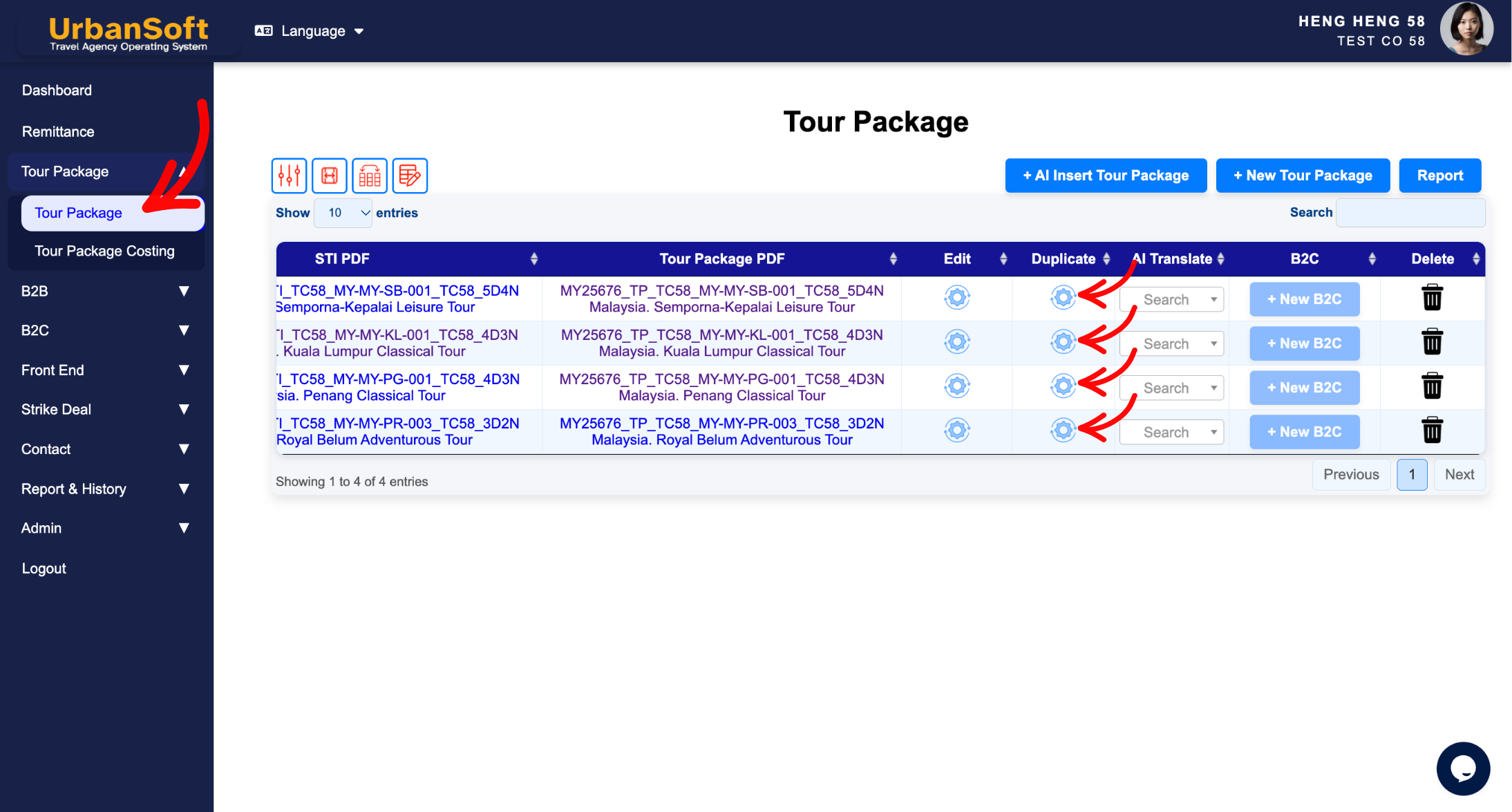
From the main navigation menu on the left, go to Tour Package > Tour Package, overhere will have tour package index table.
-
Locate the tour package you wish to duplicate using the search or filter options.
-
Click the Duplicate (Roll gear icon) button next to the target package in the action column, at the end of the table
-
Confirm the duplication request when prompted by the system.
-
System will automatically create a new copy (usually named with a prefix or suffix like "Copy of...") and open it in the package editor.
-
Update the Package Name, Package Code, Departure Dates, Pricing, and any specific itinerary details as needed.
-
Review all updated information to ensure accuracy.
-
Click Update at the bottom of the page to apply the changes, to make the new duplicated package active.
Expected Result
A new, independent tour package will be generated with all content copied from the original package. Any changes made to the duplicated package will not affect the original tour package.
Important Notes
-
Duplicating saves significant setup time by retaining all complex daily itineraries, images, and terms.
-
Make sure to check departure dates and pricing, as cloned dates may need resetting for the new season.
Common Mistakes
-
Forgetting to change the name and code of the duplicated package, leading to confusion with the original listing.
-
Publishing the cloned package without updating the departure dates or rates.
-
Confusing editing the original package with editing the newly duplicated copy.
Different Angles: Same Stories, Same Content, New Perspective
-
Where can I copy or clone a tour package in UrbanSoft?
-
How do I make a copy of an existing itinerary to use for another tour?
-
Can I reuse data from my previous packages for a new tour package?
-
How to duplicate an existing tour package to create a new one?
Same Folder Articles
-
 How to create "New Tour Package" manually?
-
How to create "New Tour Package", with "Ai Insert Tour Package" feature?
-
How to edit or update an existing "Tour Package"?
-
How to use "Ai Translate" to translate assisting tour package to another new other language tour package?
-
How to "Search and Filter" tour packages in Tour Package Index Table?
