.gif)
.gif)
.gif)

 What should be filled out in the "Attraction Ticket" field in Setting > General and Included & Excluded section?
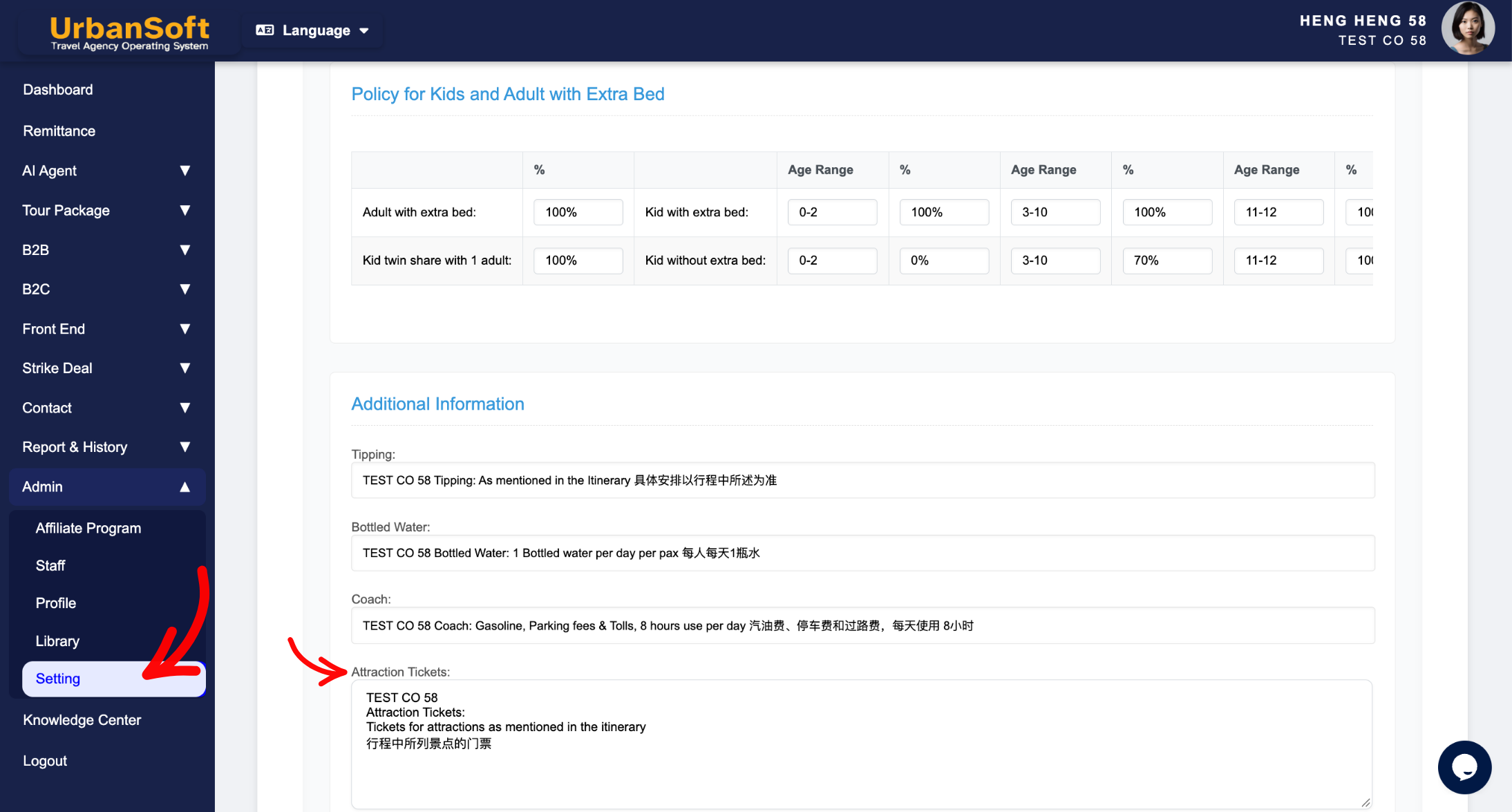
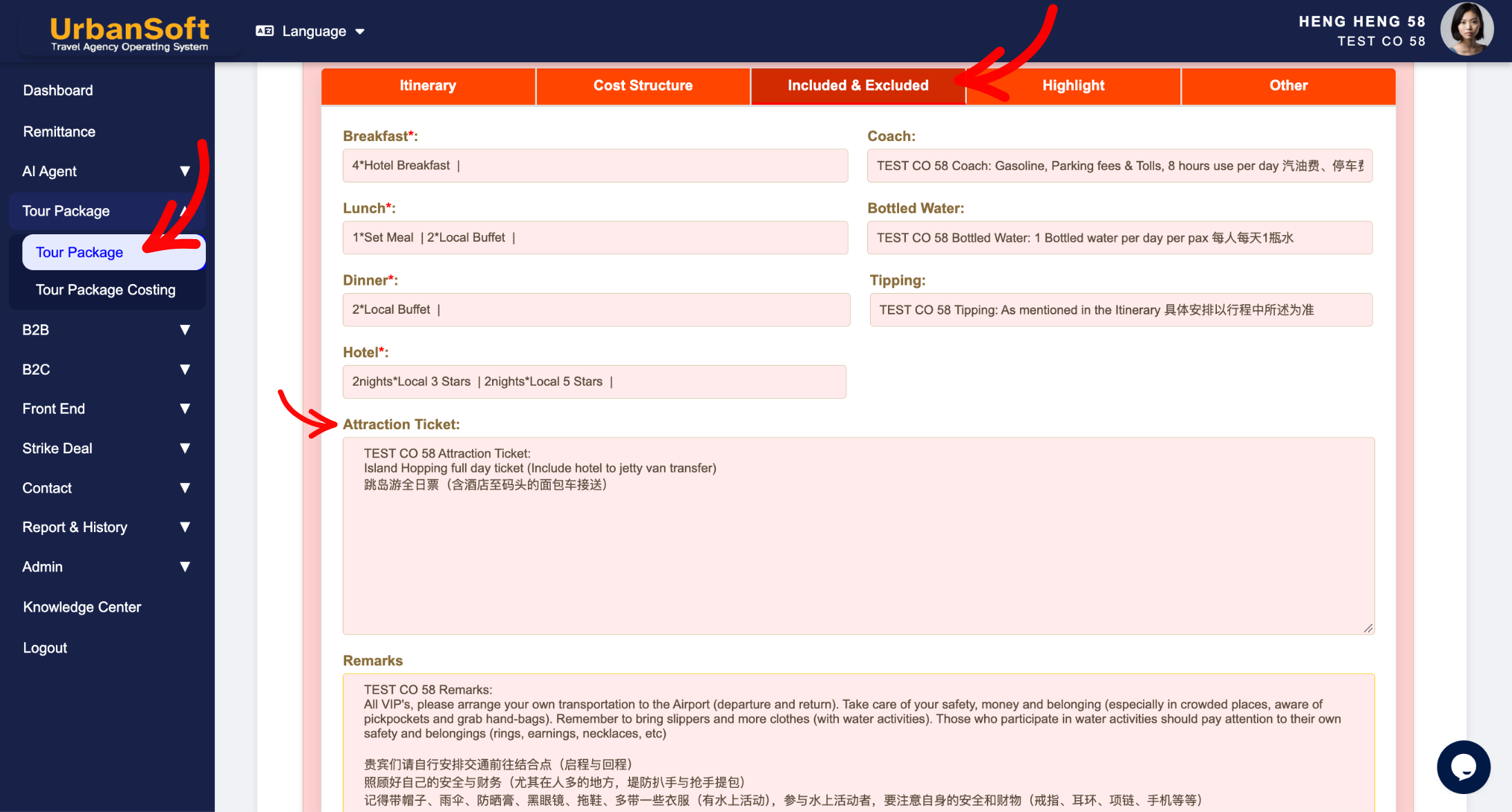
The Attraction Ticket field in the Included & Excluded section of an UrbanSoft tour package clearly details the attraction admission tickets, funicular rides, and activity entry passes covered by the base package fee. Specifying exact tickets included prevents misunderstandings on-site and assures travelers of seamless access to listed landmarks. Global default terms for attraction tickets are configured under Admin > Setting > General and can be freely modified when creating new tour packages without altering existing packages in your database.
What Can I Do?
You can clarify admission coverage and manage defaults using the following options:
-
Specify Included Entry Tickets: Itemize exact attraction ans activity entry passes, museum tickets, national park admissions, or specialty transportation tickets (e.g., cable cars, funiculars) included in the tour price.
-
Configure Global General Defaults: Set standard attraction ticket default terms under
Admin > Setting > Generalso every new tour package pre-populates with standard admission policies. -
Customize per Tour Package: Override or expand attraction ticket lists on individual packages to match specific destination itineraries or special promotional packages.
-
Protect Database Integrity: Edit attraction ticket details on new packages safely—changes apply exclusively to the package being edited without impacting existing tour packages.
Field Definitions & Ideal Inputs
-
Attraction Entry List: Clear breakdown of covered admissions, such as:
-
Sightseeing landmark passes (e.g., Penang Hill Funicular Railway tickets, Botanical Garden shuttle passes).
-
Activity participate fee.
-
Theme park or museum entrance tickets.
-
Cable car, scenic boat, or specialized transit passes.
-
Local cultural performance or UNESCO heritage site entrance permits.
-
-
Default General Template (
Admin > Setting > General): System-wide global default attraction terms that auto-fill into every newly created tour package. -
Package-Level Override: Direct editing capability within a specific package that updates only that record without altering global admin defaults.
Example
For a Penang heritage tour package, you can set the global default in Admin > Setting > General for general entrance disclaimers. When creating a specific Penang tour package, you can customize the Attraction Ticket field to state: "Includes full entry tickets to Penang Hill Funicular Railway, Pinang Peranakan Mansion, and Habitat Canopy Walk."
Important Notes
-
Default attraction terms set in
Admin > Setting > Generalautomatically populate newly created packages, speeding up package setup. -
Editing the Attraction Ticket field inside a new or existing package updates that specific package only—it does not alter global admin defaults or affect existing packages in the system.
-
Detailed Attraction Ticket breakdowns appear on generated customer quotes and PDF itineraries, giving buyers clear visibility into included ticket values.
Different Angles: Same Stories, Same Content, New Perspective
- What details should be included in the Attraction Ticket field when setting up a tour package in UrbanSoft?
Same Folder Articles
Related Articles
-
 What should be filled out in the "Price Included" field in Setting > Notice and Included & Excluded section?
-
What should be filled out in the "Price Excluded" field in Setting > Notice and Included & Excluded section?
-
What should be filled out in the "Notice" field in Setting > Notice and Cost Structure section?
-
What should be filled out in the "Surcharges for Public Holiday & Peak Seasons" field in Setting > General and Cost Structure section?
-
Why can't I edit the "Breakfast, Lunch, Lunch & Hotel" details in the Inclusions & Exclusions section?
