.gif)
.gif)
.gif)

 What information should be include in the "Included & Excluded" tab?
The Included & Excluded section in an UrbanSoft tour package aggregates all service commitments, meal counts, hotel stays, transport logistics, and cost boundaries into one central repository. It combines system-automated calculations (derived directly from your daily itinerary) with editable default templates (configured in Admin settings). Properly filling out this section guarantees absolute transparency between tour operators, sales teams, and travelers, regarding what is covered in the package price versus what incurs out-of-pocket expenses.
What Can I Do?
You can verify auto-calculated summary counts and manage customized inclusions using the following options:
-
Review Automated Summary Metrics: Verify system-generated counts for meals and hotel stays calculated directly from your daily itinerary inputs.
-
Configure Ground Transportation & Amenities: Specify vehicle usage terms, complimentary bottled water quotas, and tipping expectations.
-
Define Admissions & Operational Remarks: Itemize included attraction entrance tickets and record special operational remarks.
-
Set Itemized Inclusion & Exclusion Clauses: Provide comprehensive bullet points detailing all covered services and explicit out-of-pocket expenses.
-
Validate & Save Cost Structure Entries: Use completion status checks to ensure all mandatory fields are populated before clicking Update to save your progress.
Field Definitions & Ideal Inputs
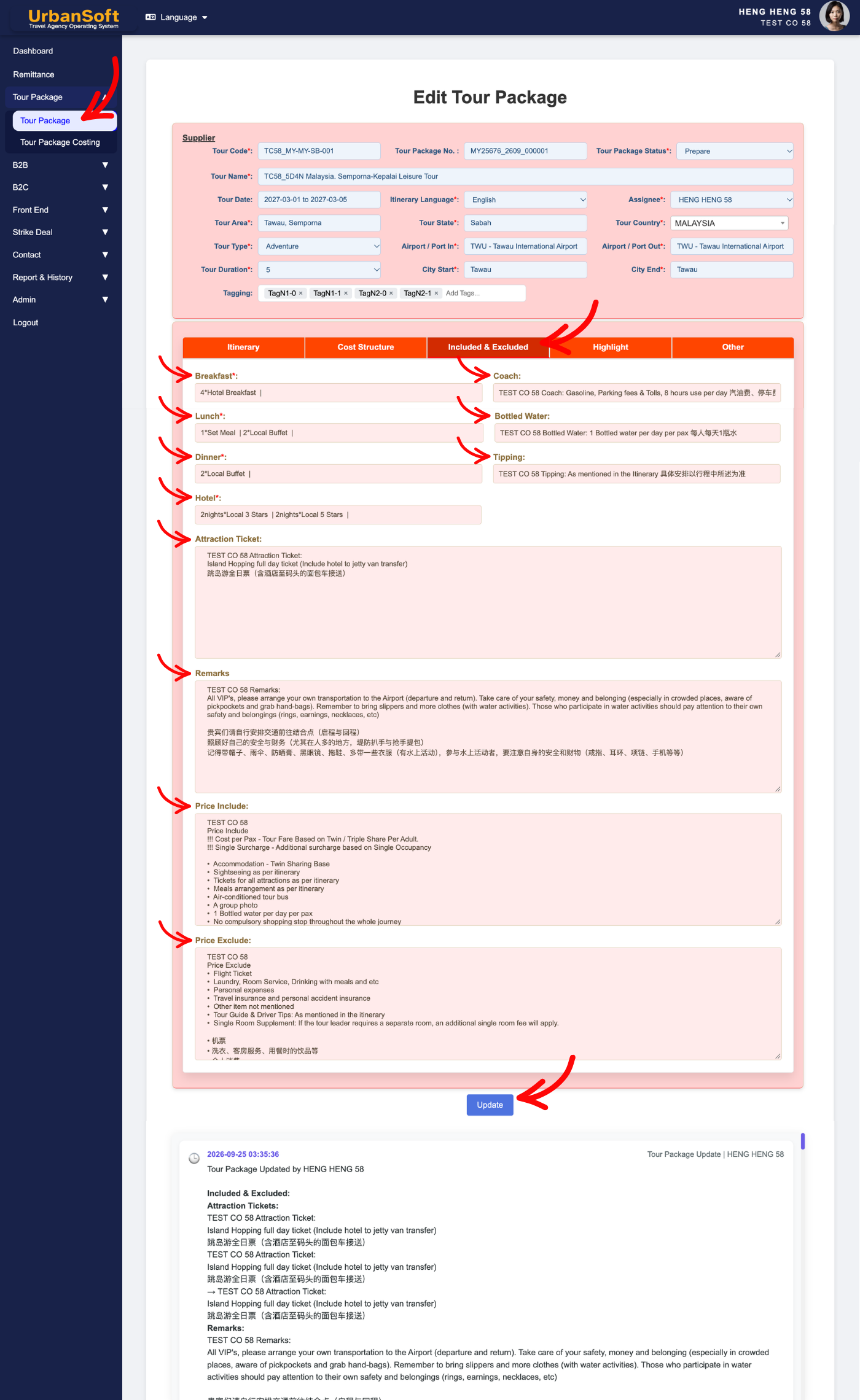
-
Breakfast*: System-generated count displaying total breakfast meals and meal types based on itinerary inputs (e.g., "4*Hotel Breakfasts"). Cannot be manually modified.
-
Lunch*: System-generated count displaying total lunches and meal categories (e.g., "1*Set Meal | 2*Local Buffet"). Cannot be manually modified.
-
Dinner*: System-generated count displaying total dinners and dining styles (e.g., "2*Local Buffet | 1*Local Cuisine"). Cannot be manually modified.
-
Hotel*: System-generated summary showing total nights stayed and hotel star ratings across the itinerary (e.g., "2nights*Local 3 Stars | 2nights*Local 5 Stars"). Cannot be manually modified.
-
Coach: Ground transportation arrangements provided for the group (defaulted from
Admin > Setting > General, editable per package; e.g., "Gasoline, Parking fees & Tolls, 8 hours use per day" or "Air-conditioned private coach transfer throughout the tour" or "14-Seater VIP Van"). -
Bottled Water: Complimentary drinking water allowance allocated per guest (defaulted from
Admin > Setting > General, editable per package; e.g., "1 bottle of mineral water per person per day"). -
Tipping: Gratuity policies and daily or per-tour guide/driver tip expectations (defaulted from
Admin > Setting > General, editable per package; e.g., "Included"or "Excluded - USD 5 per person per day payable on-site"). -
Attraction Ticket: Admission tickets and activity entry passes included in the base price (defaulted from
Admin > Setting > General, editable per package; "Includes entry tickets to Penang Hill Funicular Railway"). -
Remarks: Additional operational disclaimers or service advisories regarding package inclusions (e.g., All parties should be aware that disturbances may occur in certain areas along this group's route.").
-
Price Include: Clear bulleted list summarizing all items covered by the total tour package cost (defaulted from
Admin > Setting > Notice, editable per package; e.g., "Accommodation, specified meals, transportation, English-speaking guide, entrance fees"). -
Price Exclude: Explicit list of expenses not covered, or borne directly by the traveler (defaulted from
Admin > Setting > Notice, editable per package; e.g., "Personal expenses, travel insurance, flight tickets, optional tours, porterage fees"). -
Complete All Field: A quick checklist status ensuring tipping, attraction tickets, price inclusions, and price exclusions are fully populated before proceeding.
-
Update: Action button to save all entries and progress within the Included & Excluded module.
Example
When setting up a 5-Day Penang & Langkawi tour package, the system automatically calculates:
-
Breakfast*:
4*Hotel Breakfasts -
Hotel*:
2nights*4 Star Hotel | 2nights*5 Star Beach Resort
You then review and customize the editable fields:
-
Coach:
Air-conditioned 18-Seater VIP Coach with driver -
Bottled Water:
2 bottles of 500ml mineral water per person per day -
Price Include:
4-star accommodations, daily breakfast, 3 lunches, 2 dinners, funicular railway tickets, and airport transfers. -
Price Exclude:
International airfare, travel insurance, personal laundry, and tipping ($5/day per guest). -
Click Update after verifying Complete All Field status.
Important Notes
-
Auto-generated fields (Breakfast*, Lunch*, Dinner*, Hotel*) update dynamically whenever changes are made to the daily itinerary tab, after update need to repress the browse.
-
Overriding default text for Coach, Bottled Water, Tipping, Attraction Ticket, Price Include, or Price Exclude applies strictly to the current package and does not overwrite global defaults in
Admin > Setting. -
Completing all fields prevents missing details from appearing on generated client quotes, proposals, and PDF itineraries.
Different Angles: Same Stories, Same Content, New Perspective
- What components and auto-calculated metrics make up the Included & Excluded section when configuring a tour package in UrbanSoft?
-
Where do Price Include and Exclude details display on customer documents?
Same Folder Articles
-
 How to create "New Tour Package" manually?
-
How to create "New Tour Package", with "Ai Insert Tour Package" feature?
-
How to edit or update an existing "Tour Package"?
-
How to duplicate assisting "Tour Package"?
-
How to use "Ai Translate" to translate assisting tour package to another new other language tour package?
Related Articles
-
What should be filled out in the "Price Included" field in Setting > Notice and Included & Excluded section?
-
What should be filled out in the "Price Excluded" field in Setting > Notice and Included & Excluded section?
-
What should be filled out in the "Notice" field in Setting > Notice and Cost Structure section?
-
What information should be include in the "Admin > Setting > Notice" tab?
