.gif)
.gif)
.gif)

 What kind of details can be preset on the "Admin > Setting" page?
The Setting page in UrbanSoft allows users to configure and save default system-wide configurations, package templates, operational parameters, and standard business defaults. It acts as a central control panel that automatically populates repetitive information across your workflows, saving you time and reducing manual effort when creating new tour packages, quotations, tour itinerary brochure, invoice & receipt or managing operations.
What Can I Do?
On the Setting page, you can preset a wide range of operational and business defaults, including:
-
Tour Package Defaults: Standard itinerary structures, default terms and conditions, inclusions/exclusions, and default B2B or B2C settings.
-
Costing & Pricing Configurations: Base currency, default profit margins, markup rates, and standard cost structures.
-
Guide & Language Settings: Default tour guide languages, standard guide fees, and tipping policies.
-
Company & Contact Profile: Default company details, logo, branding colors, and communication footers for generated documents.
-
Booking & Payment Rules: Preset deposit percentages, cancellation policies, and accepted payment terms.
-
Client Request: Preset client request information and flight detail.
-
Printing PDF: Preset brochure headline, watermark, PDF table layout, font, company theme, color, quotation design and arrangement, PDF selection style and content.
-
TI Brochure: Preset TI brochure content, font, cover logo, company slogan, welcome letter.
-
Invoice & Receipt: Preset quotation, invoice, receipt, table theme, themplate, PDF content, numbering & details, due date, notes, payment Instructions, tax rate, confirmation info, showing term & condition, payment alert.
-
Download & Delete: Download to backup all file locatly, delete all file.
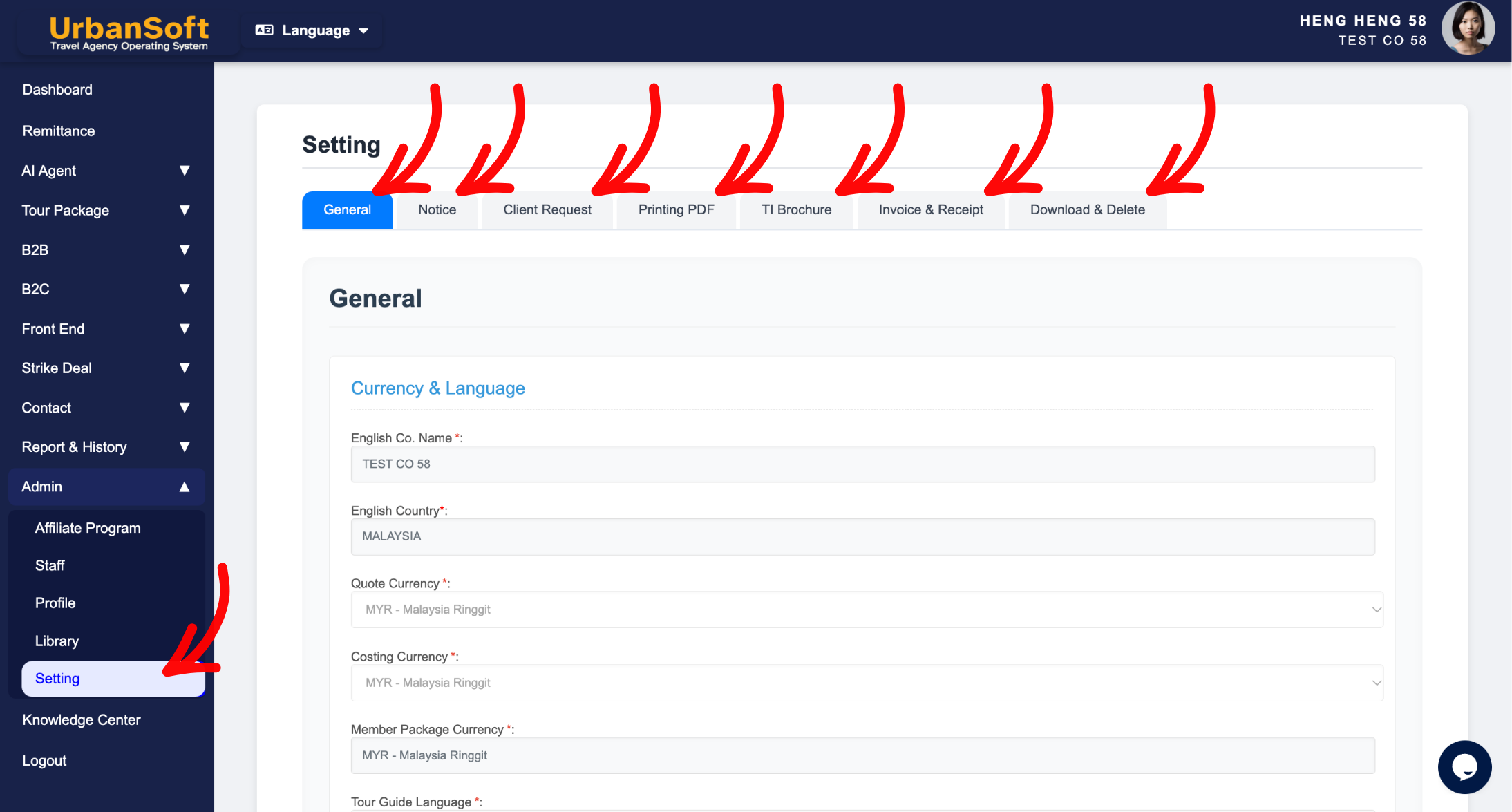
Example
For example, if your agency frequently creates tour packages with standard terms and inclusions, you can preset these details on the Setting page. Whenever you launch a new tour package, all your standard inclusions, terms, and cost structures will autofill automatically, eliminating the need to re-type the same information every time.
Important Notes
-
Presetting defaults does not lock your content; you can always customize and override these details for specific tour packages, tour itinerary brochure, invoice and receipt after creation.
-
Any updates made on the Setting page apply to future package creations and will not automatically alter or overwrite existing active packages.
-
Ensure your default values (such as currency and tax settings) are accurate to prevent calculation errors across your operations.
Different Angles: Same Stories, Same Content, New Perspective
-
What information can I configure in my system default settings?
-
How can I automate repetitive data entry when creating tour packages?
Same Folder Articles
Related Articles
-
 What does "B2B or B2C Internal Deadline" mean in the Setting > General and B2B or B2C?
-
Can I modify Tour Package information, after setting defaults on the "Admin > Setting" page?
-
How can I preset default information, for all Tour Packages in the "Admin > Setting" page?
-
Will changes made on the "Setting" page, affect my existing "Tour Packages"?
-
How to edit or update "My Setting"?
