.gif)
.gif)
.gif)

 What should be filled out in the "Itinerary" field in itinerary section?
The Itinerary / Description / Daily Schedule field in the itinerary section is the narrative core of each day's schedule within an UrbanSoft tour package. It provides a detailed, step-by-step breakdown of the day's morning, afternoon, and evening activities, attractions visited, sightseeing spots, entry points, travel distances, and timing. Depending on your system membership tier, this field can be manually populated or dynamically synchronized via the Destination Management Center (DMC) library.
What Can I Do?
Depending on your subscription tier, you can populate and manage daily schedule descriptions using the following options:
-
Manual Input (Available to All Tiers): Enter detailed, step-by-step descriptions for morning, afternoon, and evening activities, sightseeing spots, entry points, travel distances, and time schedules manually.
-
Dynamic DMC Synchronization (Launch Tier & Above): Select pre-configured destination templates from the DMC library (Admin > Library > D.M.C), to automatically insert detailed activity descriptions into the itinerary, while simultaneously syncing highlights, background stories, and images to their respective sections.
Field Definitions & Operational Guidance
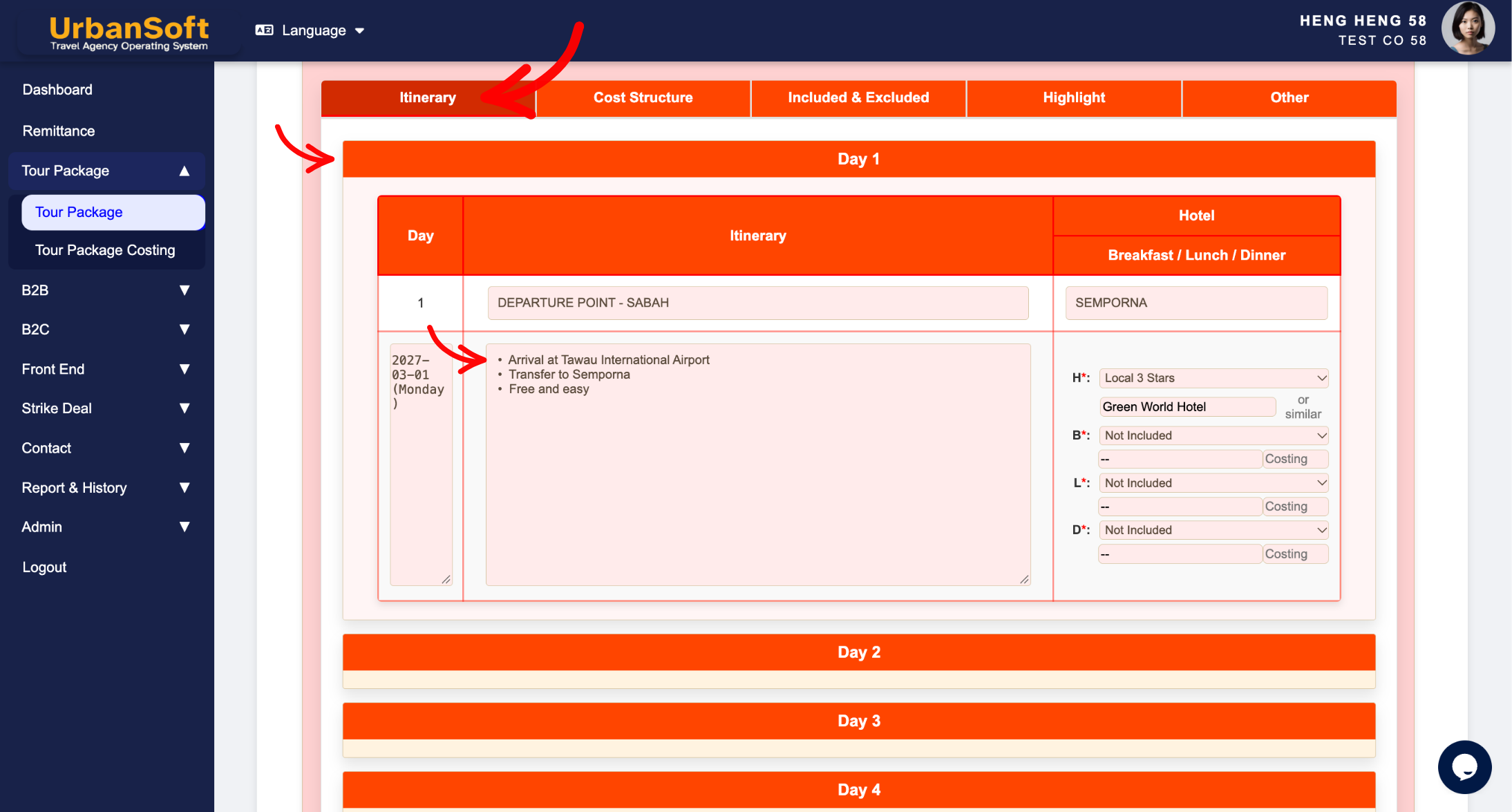
1. Membership Tier Capabilities
-
Launch Tier & Above Members: Can choose between manual entry or using the DMC (Destination Management Center) automation tool.
-
Starter Tier Members: Restricted to manual input only. Planners must type out or paste all daily schedule details, activity breakdowns, and timing manually into the text area.
2. DMC Synchronization & Library Path
-
DMC Library Location: DMC templates are pre-built and managed globally under
Admin > Library > D.M.C. -
Syncing to Package: Selecting and inserting a pre-set itinerary from the DMC panel under the Itinerary tab automatically populates the daily description field and allows reordering of activity sequence. It also synchronizes related content into the Highlight and Other tabs.
Example
When setting up Day 3 of a 5-Day Heritage Tour package:
-
Manual Entry Option (Starter Tier): Type in: "09:00 AM - Pick up from hotel lobby. Visit Georgetown Heritage Zone, including Pinang Peranakan Mansion and Khoo Kongsi. 12:30 PM - Nyonya Lunch. 02:00 PM - Proceed to Penang Hill via Funicular Railway."
-
DMC Preset Option (Launch Tier & Above): Go to the DMC section under the Itinerary tab, add row, select "Georgetown Cultural Walking Tour" from dropdown list, check Insert Itinerary, click Update D.M.C, and click Insert to Tour Package to instantly populate the full daily description.
Important Notes
-
Sourcing daily schedule descriptions from the DMC library (
Admin > Library > D.M.C) saves significant operational time and ensures standardized, high-quality description text across all sales proposals. -
For multi-day itineraries, manually entered descriptions should maintain consistent time formatting and clear bullet points for optimum client readability.
Different Angles: Same Stories, Same Content, New Perspective
- How do Starter and Launch tier memberships differ when filling out daily schedule details, and how does the DMC library streamline itinerary entry in UrbanSoft tour packages?
Same Folder Articles
-
 How to create "New Tour Package" manually?
-
How to create "New Tour Package", with "Ai Insert Tour Package" feature?
-
How to edit or update an existing "Tour Package"?
-
How to duplicate assisting "Tour Package"?
-
How to use "Ai Translate" to translate assisting tour package to another new other language tour package?
Related Articles
-
How to insert itinerary from "DMC (Destination Management Center)" to active Tour Package?
-
What information should be include in the "Itinerary" tab?
-
What information should be include in the "Highlight" tab?
-
What information should be include in the "Other" tab?
-
What information should be include in the "Tour Package Basic Information" tab?
