.gif)
.gif)
.gif)

 What information should be include in the "Admin > Setting > Client Request" tab?
The Admin > Setting > Client Request tab in UrbanSoft serves as the master configuration center for establishing default options, standard choices lists, and disclaimers for customized B2B partners client demands and flight handling. Pre-defining these choices lists streamlines the booking intake workflow across your agency, enabling your team to quickly log special guest requirements and flight preferences when building customized tour packages or processing sales inquiries.
What Can I Do?
You can set up and manage your agency's standardized client request and flight arrangement templates using the following key functions:
-
Pre-Configure Special Client Requests: Build a standardized choices list for special dietary needs, room preferences, accessibility support, or celebration requests (e.g., dietary restrictions, bed arrangements, wheel-chair accessibility).
-
Standardize Flight Handling Templates: Establish standard placeholder templates or default information regarding, baseline disclaimers, baggage allowance standards, flight inclusions, light numbers, arrival/departure routing, airline schedules or client-provided flight submission deadlines.
-
Verify Configuration Completeness: Review a status summary verifying that all Client Request and Flight fields are fully populated before saving.
Field Definitions & Operational Guidance
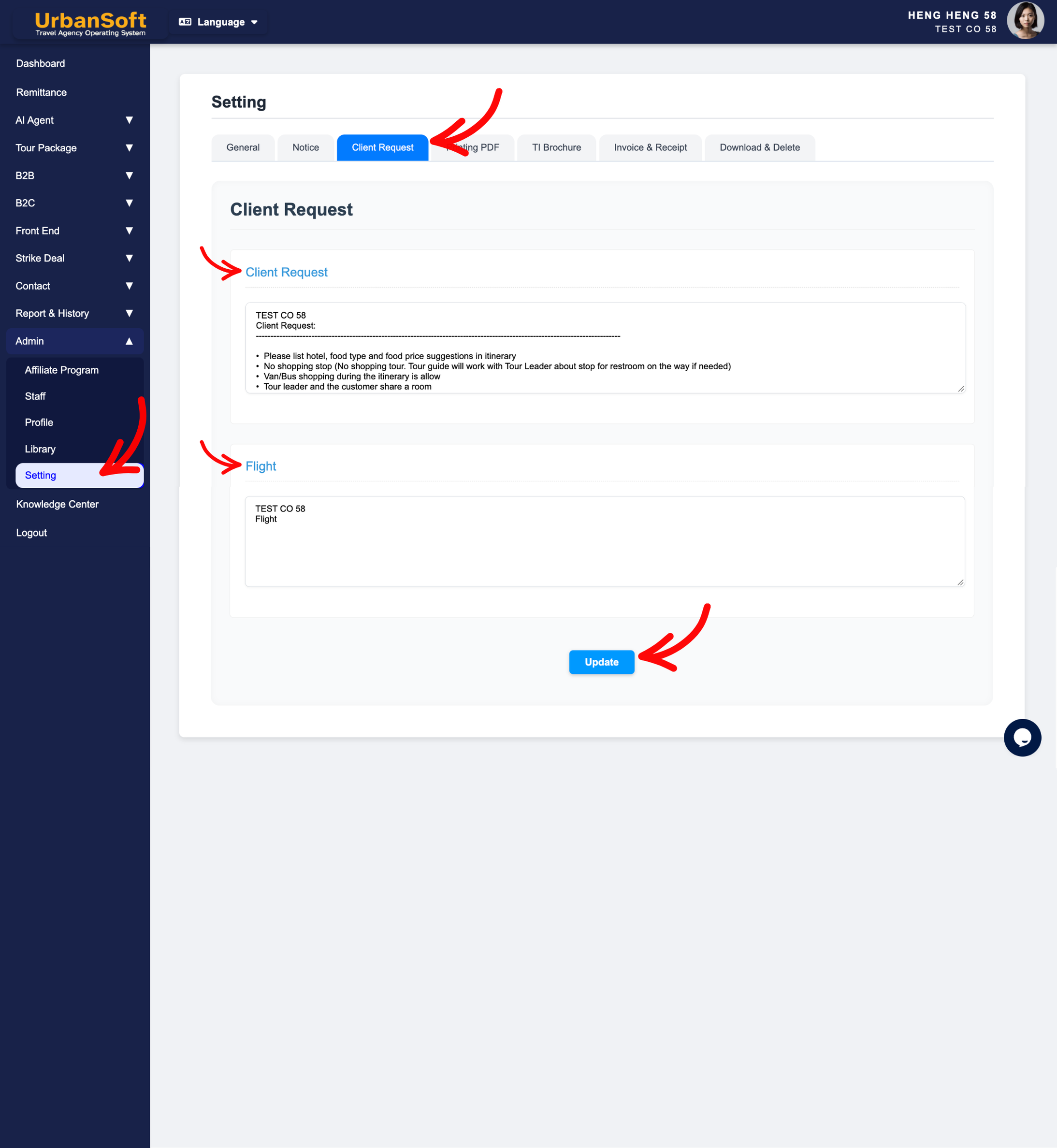
1. Special Demands & Guest Preferences
-
Client Request: Enter or pre-configure a standard choices list and request templates for common special client preferences and customized requirements (e.g.,
"Wheelchair Assistance required","Adjoining / Connecting Rooms","High Floor Room Preference","Dietary Restrictions: Vegetarian / Halal / No Pork / No Lard", or"Honeymoon Decoration / Special Celebration"or"room arrangements (Adjoining Rooms, King Bed)"). Pre-defining these options helps your team quickly record client demands during booking intake.
2. Flight Logistics & Handling Policies
-
Flight: Enter or pre-configure default flight options (including flight numbers, airline carrier names, arrival/departure airport codes, and transfer timing notes), airline seating preferences, luggage allowances, or flight arrangement disclaimers for customized tour packages (e.g.,
"Include Round-Trip Air Tickets","Land Tour Only - Flight Excluded","Standard Luggage Allowance: 20kg Checked Baggage + 7kg Cabin Baggage", or"Flight details to be provided by client 14 days prior to departure").
3. Status Verification & Saving
-
Complete All Field: Displays a status summary verifying that the entire set of Client Request settings—including Client Request, Flight, and final submission—has been fully populated.
-
Update: Click this action button to save all progress, fields, and configurations for the Client Request section.
Example
When configuring default intake parameters for a travel agency:
-
Navigate to Admin > Setting > Client Request and enter standard Client Request options: "Halal Meal Request | Wheelchair Assistance | Adjoining Rooms".
-
Configure Flight handling defaults: "Land Tour Only (Flight Excluded) | Baggage Allowance: 20kg Checked + 7kg Carry-On".
-
Verify the Complete All Field indicator and click Update to save the master options globally for your sales team.
Important Notes
-
Pre-configuring client requests in
Admin > Setting > Client Requestensures your sales and operation teams use standardized terminology when taking bookings, reducing communication errors with ground handlers and suppliers. -
Modifying templates in
Admin > Setting > Client Requestsets the default for future booking intake and tour package setup without altering existing historical client records or active quotations. -
Operational staff can still adjust or override these entries on specific bookings, to accommodate tailored customer itineraries.
-
Maintaining standard client request templates, ensures seamless communication between sales agents, tour guides, and operational teams.
Different Angles: Same Stories, Same Content, New Perspective
- What default guest demand options, special preference lists, flight handling policies, and baggage disclaimers make up the Admin > Setting > Client Request tab in UrbanSoft?
- How do I set up default templates, for client special requests and flight schedules in UrbanSoft?
-
How do default templates in Client Request apply when creating a new quote?
Same Folder Articles
Related Articles
-
 What information should be include in the "Admin > Setting > General" tab?
-
What information should be include in the "Admin > Setting > Notice" tab?
-
What information should be include in the "Admin > Setting > Printing PDF" tab?
-
What information should be include in the "Admin > Setting > TI Brochure" tab?
-
What information should be include in the "Admin > Setting > Invoice & Receipt" tab?
