.gif)
.gif)
.gif)

 What information should be include in the "Admin > Setting > General" tab?
The Admin > Setting > General section in UrbanSoft serves as the central control panel for configuring global system defaults, operational policies, currency preferences, internal KPIs, payment details, and profit models. These global settings streamline tour package setup by automatically pre-populating fields across all newly created tour packages, while still allowing package-level customization.
What Can I Do?
You can establish and manage your agency's foundational rules using the following key administrative functions:
-
Configure Company, Currency & Language Preferences: Set your English company name, home country, quotation currencies, internal costing currencies, member package currencies, and default guide and itinerary languages.
-
Establish Pricing Policies & Surcharges: Define default public holiday/peak season surcharges, standard costing remarks/tax disclaimers, and structured child and extra bed pricing policies.
-
Set Additional Information Defaults: Specify baseline guidelines for tipping, bottled water, private coach transfers, and attraction ticket inclusions.
-
Manage Internal Operational Deadlines: Configure B2B supplier response time frames, B2C quotation targets, and price update timelines before quote expiration.
-
Configure Payment & Profit Models: Store default company bank/remittance details, standard markups, profit models, contingency coverage percentages, and agent commission splits.
Field Definitions & Operational Guidance
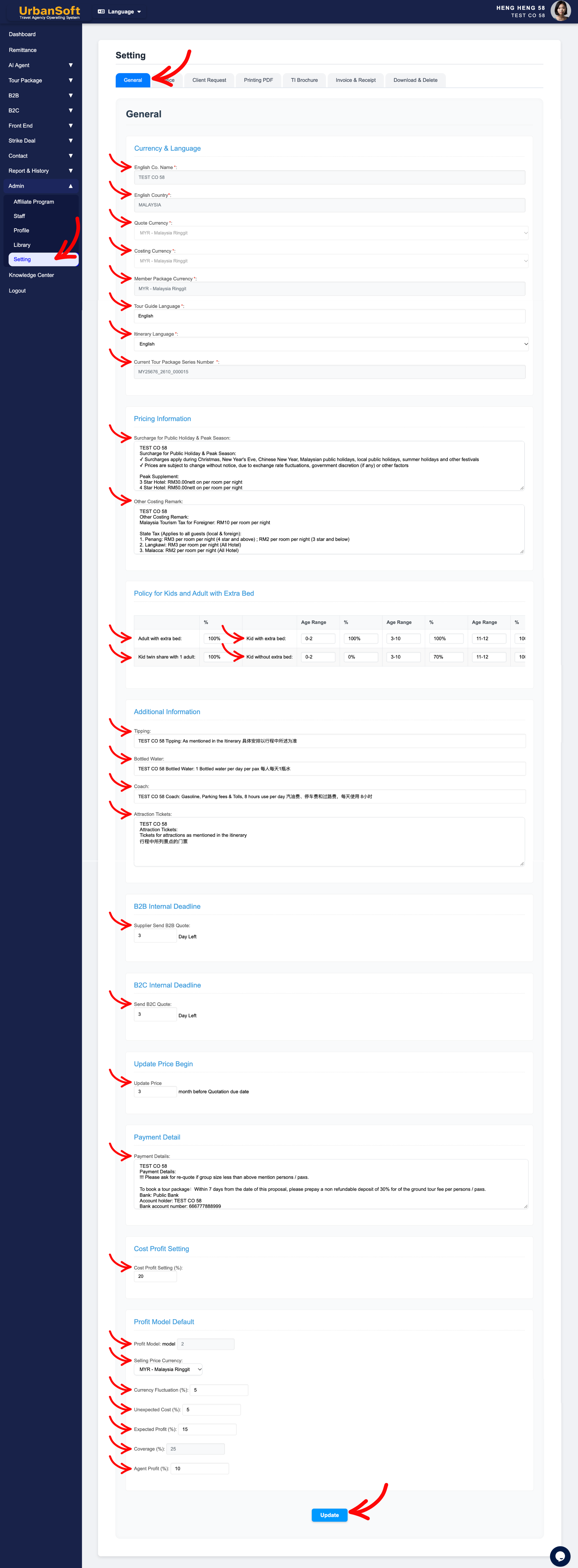
1. Currency & Language
-
English Co. Name*: Enter your officially registered English company name (e.g.,
"Urban Travel & Tour Sdn Bhd"). Note: Editable once within the first 14 days after account creation; contact support for subsequent changes. -
English Country*: Select your company's operating country (e.g.,
"Malaysia"). Note: Editable once within the first 14 days after account creation; contact support for subsequent changes. -
Quote Currency*: Select your primary client-facing selling currency (e.g.,
"MYR"or"USD"). Note: Editable once within the first 14 days after account creation; contact support for subsequent changes. Growth Membership and above can select multiple quote currencies during package assembly, whereas Starter and Launch tiers default to 1 currency. -
Costing Currency*: Select your baseline currency used for internal vendor cost aggregation and accounting calculations (e.g.,
"MYR"). Note: Editable once within the first 14 days after account creation; contact support for subsequent changes. -
Member Package Currency*: Select the currency used for member subscription pricing. Note: Editable once within the first 14 days after account creation; contact support for subsequent changes.
-
Tour Guide Language*: Set the default preferred language for tour guide services across tour packages (e.g.,
"English"or"Mandarin"). -
Itinerary Language*: Select the default language used for client itineraries (e.g.,
"English"). Note: Launch Membership and above can select multiple itinerary languages during package setup; Starter tier uses 1 default language. -
Current Tour Package Series Number *: System-generated running number sequence used to automatically tag and track tour package series.
2. Pricing Information & Policies
-
Surcharge for Public Holiday & Peak Season: Enter default text or rules regarding peak season surcharges (e.g.,
"Public Holiday & Peak Season Surcharge: USD 30 per person per night"). -
Other Costing Remark: Enter standard pricing disclaimers automatically applied to quotations (e.g.,
"Prices subject to 6% SST and hotel availability at time of booking").
3. Policy for Kids and Adult with Extra Bed
-
Adult with extra bed: Define default rates for an adult using an extra bed (e.g.,
"100% of Adult Twin Share Rate"or"90%"). -
Kid twin share with 1 adult: Define default rates for a child sharing a room with 1 adult (e.g.,
"100% of Adult Rate"). -
Kid with extra bed: Set up to 3 age ranges (e.g.,
Age 0-2,3-8,9-12) and specify default pricing percentages or fixed amounts (e.g.,"75% of Adult Rate"). -
Kid without extra bed: Set up to 3 age ranges (e.g.,
Age 0-2,3-8,9-12) and specify default pricing percentages or fixed amounts (e.g.,"50% of Adult Rate").
4. Additional Information
-
Tipping: Set standard tipping guidelines (e.g.,
"USD 5 per pax / per day for Driver and Guide"). -
Bottled Water: Set standard drinking water allowances (e.g.,
"1 bottle of mineral water per pax / per day"). -
Coach: Define standard vehicle transfer standards (e.g.,
"Air-conditioned private coach transfer with licensed driver"). -
Attraction Tickets: Set default entry ticket coverage rules (e.g.,
"Includes all entrance tickets as listed in itinerary").
5. Internal Deadlines & Pricing Controls
-
Supplier Send B2B Quote (? Day Left): Set the internal buffer/KPI days required for suppliers to submit B2B quotes prior to client deadlines (e.g.,
"3 Days"). -
Send B2C Quote (? Day Left): Set the internal target/KPI days for sales staff to issue B2C quotations to buyers (e.g.,
"2 Days"). -
Update Price Begin (? day or month before Quotation due date): Set how far in advance tour prices must be updated before quotation expiration (e.g.,
"1 Month before due date").
6. Payment Detail & Profit Model Defaults
-
Payment Details: Enter default bank account details, payment links, or remittance instructions to render on quotes and invoices (e.g.,
"Bank: Maybank | Acc No: 512345678901 | SWIFT: MBBEMYKL"). -
Cost Profit Setting (%): Set default profit margin percentage markups applied across costing modules (e.g.,
"15%"). -
Profit Model: Select the default pricing structure (e.g.,
"Model 1: Cost Plus Margin"). -
Selling Price Currency: Select the default currency used for final selling prices.
-
Currency Fluctuation (%): Set a percentage buffer to absorb foreign exchange fluctuations (e.g.,
"3%"). -
Unexpected Cost (%): Set a contingency margin for unbudgeted operational expenses (e.g.,
"2%"). -
Expected Profit (%): Set targeted net profit margins (e.g.,
"10%"). -
Coverage (%): Auto-calculated total coverage percentage (
Currency Fluctuation + Unexpected Cost + Expected Profit). -
Agent Profit (%): Set default commission/profit shares reserved for sales agents or B2B partners (e.g.,
"10%").
7. Status Verification & Saving
-
Complete All Field: Displays a status summary verifying that all General settings categories have been fully populated.
-
Update: Click this action button to save all configurations, fields, and progress for the General settings tab.
Example
When setting up a new travel agency account in UrbanSoft:
-
Navigate to Admin > Setting > General and configure English Co. Name: "Urban Travel & Tour Sdn Bhd", English Country: "Malaysia", and Quote Currency: "MYR".
-
Configure Policy for Kids and Adult with Extra Bed by setting
Kid with extra bed (Age 3-11)to"75% of Adult Rate". -
Set Payment Details with your primary Maybank banking details and set Cost Profit Setting (%) to
"15%". -
Check the Complete All Field verification indicator and click Update to save your company defaults globally.
Important Notes
-
Core identity fields—such as Company Name, Country, Quote Currency, Costing Currency, and Member Package Currency—are restricted to a one-time edit within 14 days after account registration. Further changes require contacting UrbanSoft support.
-
Defaults configured here auto-load into newly created tour packages, saving data entry time while preserving the ability to customize individual tour packages without altering global settings.
-
Mandatory fields marked with an asterisk (
*) must be completed before saving your profile. -
Specific tour packages can still override, these general settings when necessary.
Different Angles: Same Stories, Same Content, New Perspective
- What core company defaults, currency rules, child pricing policies, internal deadlines, and profit settings make up the Admin > Setting > General tab in UrbanSoft?
-
How do I configure my default tour prices, profit margins, and currency settings in UrbanSoft?
Related Articles
-
What information should be included in the "Tour Package Basic Information" section?
-
What information should be included in the "Cost Structure" section?
-
What is the relationship between "Costing Currency, Quote Currency, Current Rate, and Fixed Rate" in tour package?
-
What should be filled out in the "Surcharges for Public Holiday & Peak Seasons" field in cost structure section?
-
How does UrbanSoft auto-generate package series numbers?
-
How to manage general system settings in UrbanSoft?
Same Folder Articles
Related Articles
-
 What information should be include in the "Admin > Setting > Notice" tab?
-
What information should be include in the "Admin > Setting > Client Request" tab?
-
What information should be include in the "Admin > Setting > Printing PDF" tab?
-
What information should be include in the "Admin > Setting > TI Brochure" tab?
-
What information should be include in the "Admin > Setting > Invoice & Receipt" tab?
