.gif)
.gif)
.gif)

 What is a "Update Price Begin" in Setting > General and B2B?
The Update Price Begin field (located globally in Admin > Setting > General and applied within individual tour package B2B costing and quotation sections) is an operational time-buffer threshold. It defines how far in advance tour prices must be updated before a quotation due date expires. Setting this parameter triggers system reminders and alerts for sales and operations teams, ensuring prices are reviewed and renewed before quotations become invalid or outdated.
What Can I Do?
You can manage quotation price validity and system advance alerts using the following key functions:
-
Set Advance Update Timelines: Configure a specific month buffer (e.g.,
1 Month before due date) to establish when price reviews must begin before a quotation expires. -
Automate Price Expiration Alerts: Enable UrbanSoft to track quotation due dates automatically and flag packages that require price updates.
-
Prevent Outdated Pricing: Ensure B2B partners and clients receive current, updated rates, protecting your margins against unexpected supplier price hikes.
-
Automate Supplier Price Refresh Windows: Establish a systematic timeframe for contacting your suppliers for updated rates before current contracts or quotes expire.
-
Manage Pricing Timelines: Ensure your team has adequate lead time to renegotiate rates, update sales catalogs, and maintain consistent margins for upcoming travel seasons.
Field Definitions & Operational Guidance
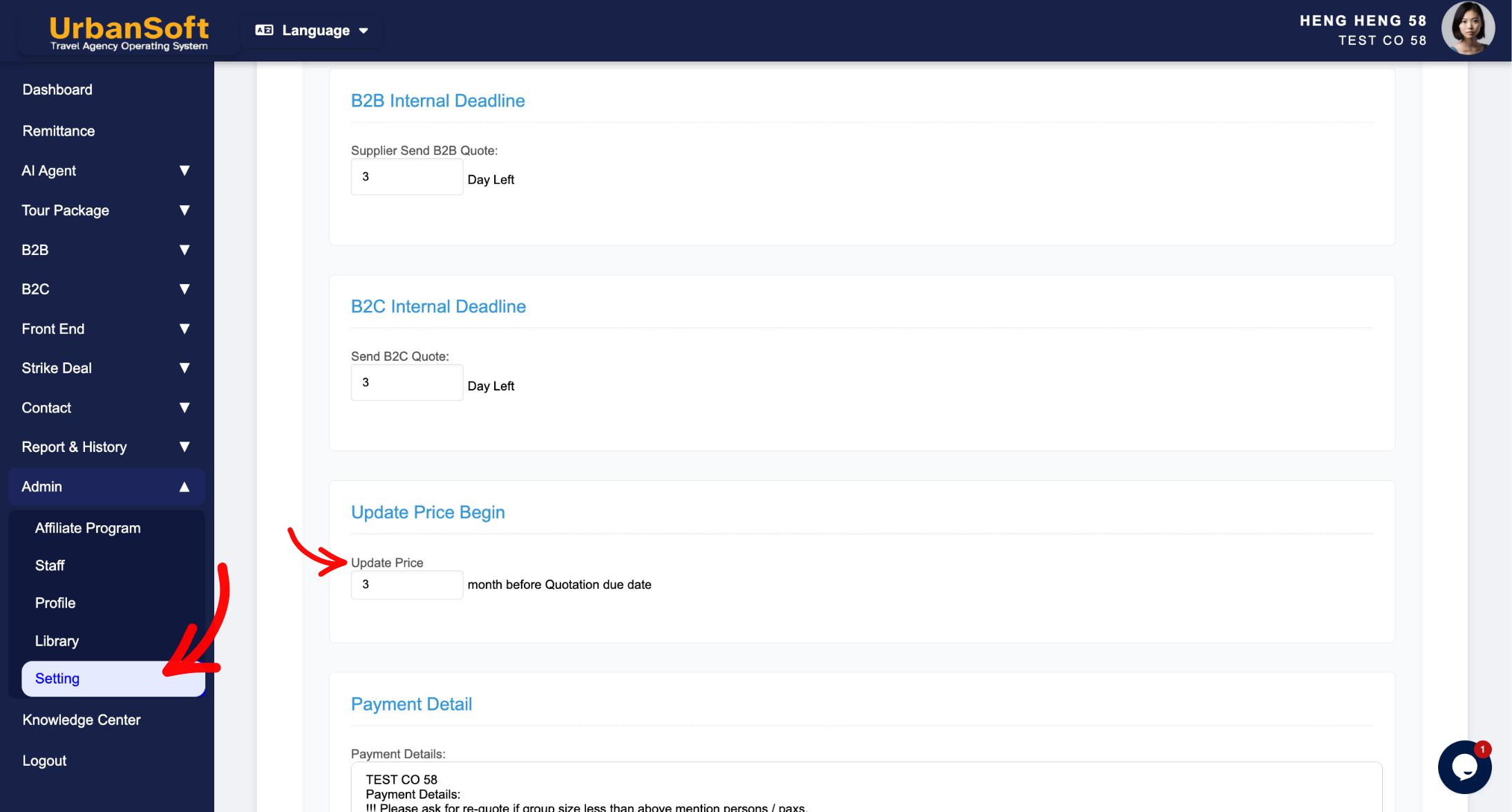
1. Update Price Begin Definition
-
Update Price Begin (? month before Quotation due date): Set how far in advance tour prices must be updated before the quotation expires (e.g.,
"1 Month before due date"), enter only number of month.
2. System Application & Navigation Paths
-
Global Default Path (
Admin > Setting > General): Serves as the agency-wide default threshold for all new tour packages and B2B quotation workflows. -
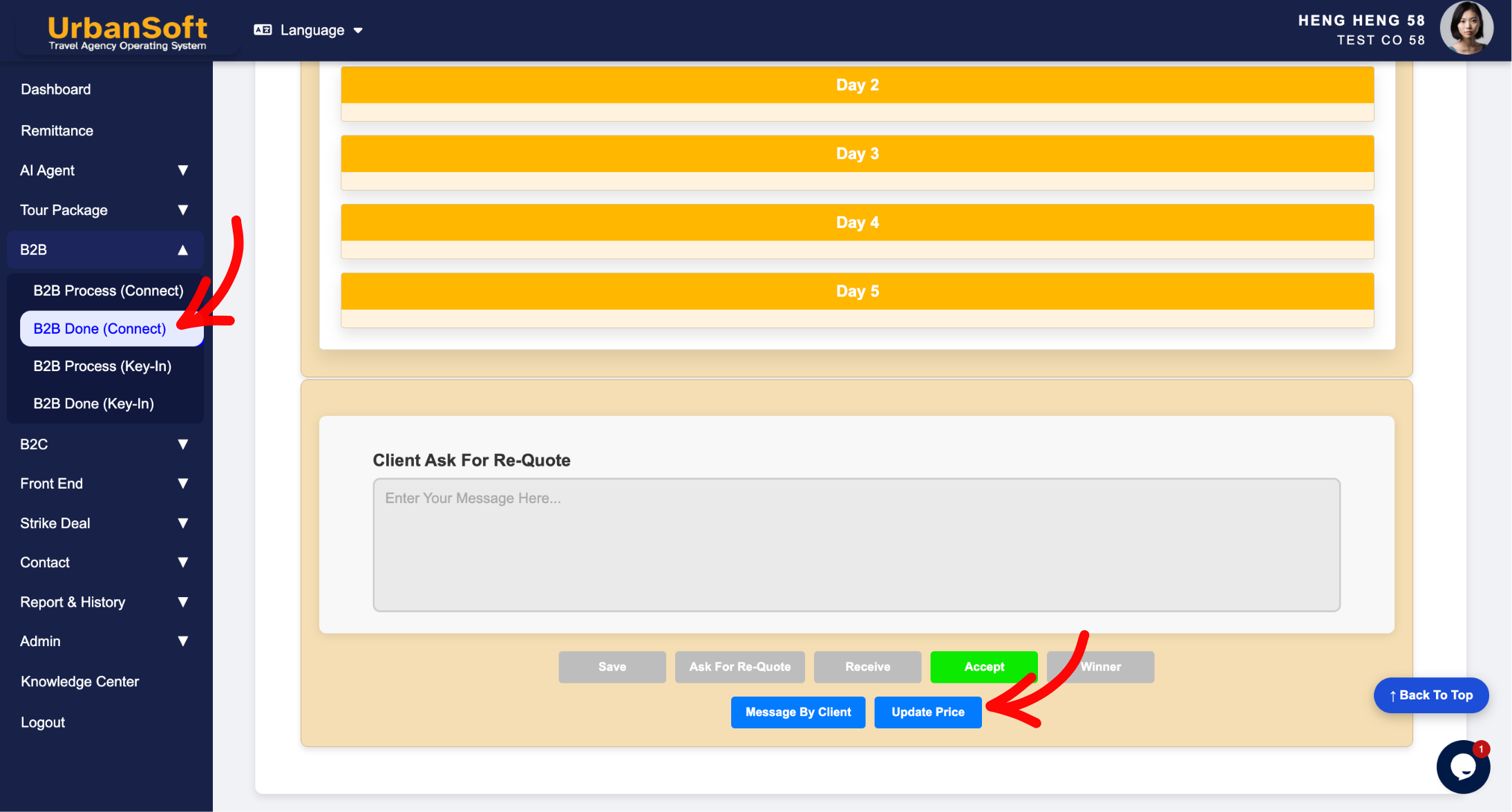
Package Level Path (
B2B > Received / Accepted / Winner Section): Auto-inherits the global setting, allowing planners to adjust advance update timelines for specific B2B packages or seasonal quotes with strict supplier deadlines.
Example
When managing B2B quotation price updates for a travel agency:
-
Navigate to Admin > Setting > General and locate Update Price Begin.
-
Set the buffer time to
"1 Month before due date"and click Update. -
If a B2B quotation due date is set to December 31, the system alerts your team on November 30 (1 month prior) to update costing figures and verify supplier rates before the quote expires.
Important Notes
-
Setting a realistic Update Price Begin buffer allows operations staff ample time to contact hotels, ground handlers, and transport providers for updated seasonal rates before quotations expire.
-
Modifying the global setting in
Admin > Setting > Generalupdates default alerts for future tour packages without altering existing active package workflows. -
The numeric value entered in this field represents the number of months prior to the quotation due date.
-
Utilizing this setting helps prevent gaps in product pricing, ensuring that your package rates remain active and available for future client bookings.
Different Angles: Same Stories, Same Content, New Perspective
- How does the Update Price Begin setting control price validity timelines, advance expiration alerts, and B2B quote renewals in UrbanSoft?
-
How does the Update Price Begin setting control when to request new rates from suppliers?
-
What is the advance notice period for supplier price updates in UrbanSoft settings?
Same Folder Articles
Related Articles
-
 What kind of details can be preset on the "Admin > Setting" page?
-
How to edit or update "My Setting"?
-
What does "B2B or B2C Internal Deadline" mean in the Setting > General and B2B or B2C?
-
How to setup "Admin > Setting" page?
-
What information should be include in the "Admin > Setting > General" tab?
