.gif)
.gif)
.gif)

 What should be filled out in the "Profit Model Default" section in Setting > General and B2C section?
The Profit Model Default section (located under Admin > Setting > General as global system defaults, and available within individual package B2C pricing modules) is a financial framework used to calculate and establish final retail selling prices, operational risk buffers, and profit distributions. It allows travel operators to define profit markup structures, protect margins against currency fluctuations and unbudgeted costs, calculate net profit targets, and allocate sales commissions for B2B partners or agents.
What Can I Do?
You can configure and manage your pricing risk buffers and profit models using the following key functions:
-
Establish Pricing Model Structures: Choose your preferred pricing model algorithm (e.g., Cost Plus Margin) to derive final retail selling prices automatically.
-
Configure Risk & Operational Buffers: Set percentage allowances to absorb unexpected foreign exchange rate shifts and unbudgeted operational expenses.
-
Set Targeted Profit & Agent Margins: Define your net profit margin expectations alongside commission or profit-sharing percentages for sales agents or B2B partners.
-
Automate Coverage Percentage Calculation: Allow the system to calculate the total operational coverage buffer percentage automatically based on your configured risk and profit inputs.
-
Maintain Payment Instructions & General Markups: Store default corporate bank account details and overall baseline cost profit markup percentages.
Field Definitions & Operational Guidance
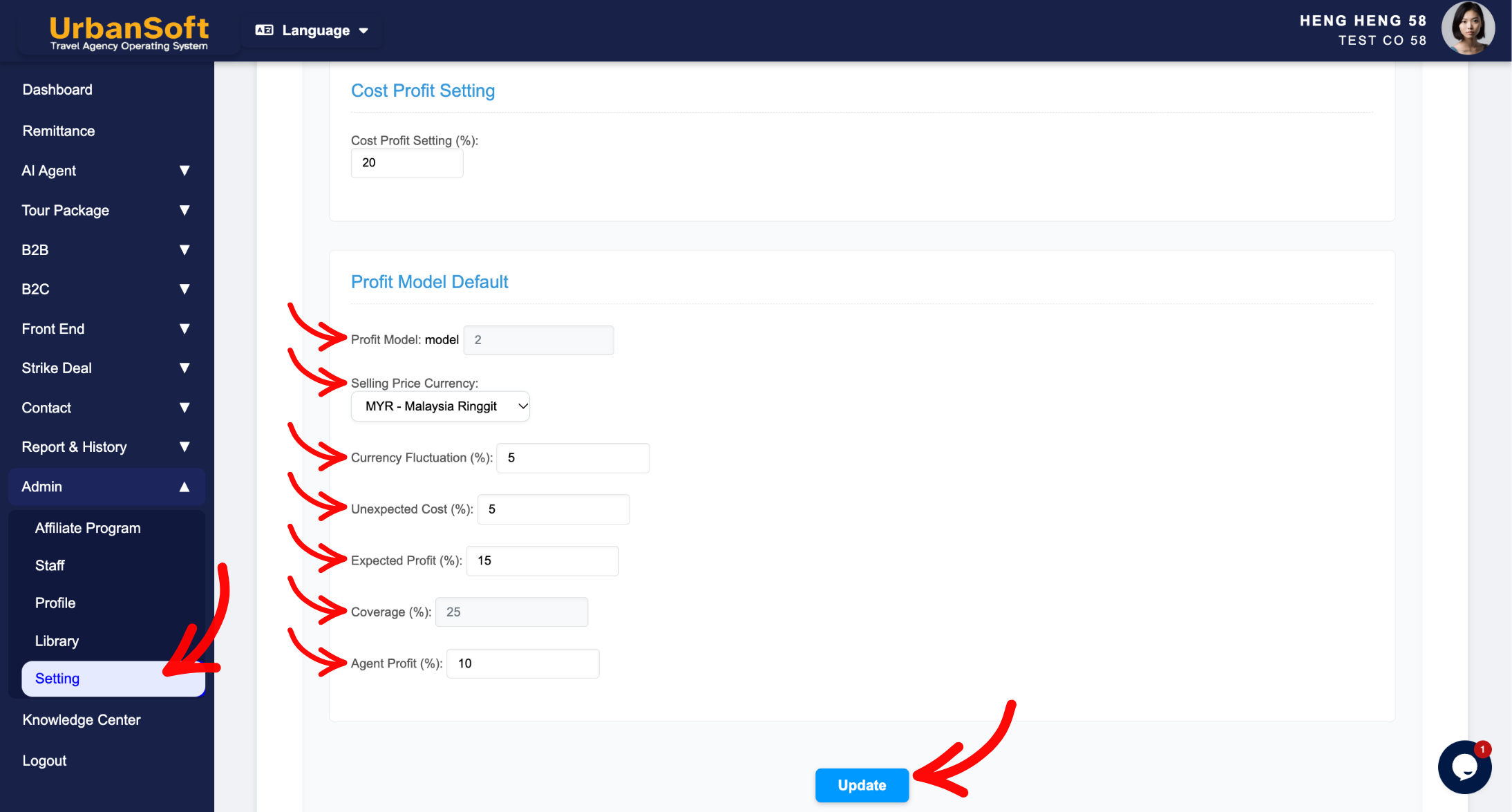
1. Profit Model Default Configuration
-
Profit Model: Select the default pricing model structure used for calculating tour prices (e.g.,
"Model 1: Cost Plus Margin"). -
Selling Price Currency: Select the default currency used for final selling prices (e.g.,
"MYR"or"USD"). -
Currency Fluctuation (%): Set a percentage buffer to absorb foreign exchange fluctuations between internal costing currencies and selling currencies (e.g.,
"3%"). -
Unexpected Cost (%): Set a contingency percentage margin to cover unbudgeted operational expenses or unexpected local ground fees (e.g.,
"2%"). -
Expected Profit (%): Set the targeted net profit margin percentage expected from the tour package (e.g.,
"10%"). -
Coverage (%): System auto-calculated total operational coverage percentage, summing up the combined risk and profit factors (
Currency Fluctuation % + Unexpected Cost % + Expected Profit %) (e.g.,"25%"or"15%"depending on risk components). -
Agent Profit (%): Set the default commission or profit-sharing percentage reserved for sales agents, trade brokers, or B2B partners (e.g.,
"10%").
2. System Application & Navigation Paths
-
Global Default Path (
Admin > Setting > General): Serves as the agency-wide master B2C consumer financial framework template that automatically auto-loads into newly initialized B2C proposals. -
Package Level Path (
B2C > Profit Model Section): Auto-inherits the global profit model setting, allowing sales planners to adjust profit markup structures, currency fluctuations and unbudgeted costs, calculate net profit targets, and allocate sales commissions for specific retail tour package quotes.
Example
When setting up global profit defaults for a travel agency:
-
Navigate to Admin > Setting > General and scroll to the Profit Model Default section.
-
Select Profit Model: "Model 1: Cost Plus Margin" and Selling Price Currency: "MYR".
-
Set Currency Fluctuation (%) to
"3%", Unexpected Cost (%) to"2%", and Expected Profit (%) to"10%". The system automatically computes Coverage (%) as"15%". -
Enter Agent Profit (%) as
"10%". -
Click Update to save the pricing logic globally.
Important Notes
-
Setting proper percentage buffers for Currency Fluctuation (%) and Unexpected Cost (%) protects travel operators against currency shifts and unforeseen ground expenses without eroding net profit margins.
-
While defaults are configured globally in
Admin > Setting > General, sales planners can adjust these profit model variables individually inside the B2C pricing section of specific tour packages when necessary.
Different Angles: Same Stories, Same Content, New Perspective
- What profit models, currency fluctuation buffers, contingency margins, net profit targets, coverage calculations, and agent commission settings make up the Profit Model Default section in UrbanSoft?
Same Folder Articles
Related Articles
-
 What information should be include in the "Admin > Setting > General" tab?
-
What information should be include in the "Admin > Setting > Invoice & Receipt" tab?
-
How to setup "Admin > Setting" page?
-
Relationship between "Costing Currency, Quote Currency, Current Rate, and Fixed Rate" in Setting > General and Tour Package?
-
What information should be include in the "Cost Structure" tab?
