.gif)
.gif)
.gif)

 What should be filled out in the "Terms & Condition for Client" field in Setting > Notice and B2B - Included & Excluded section?
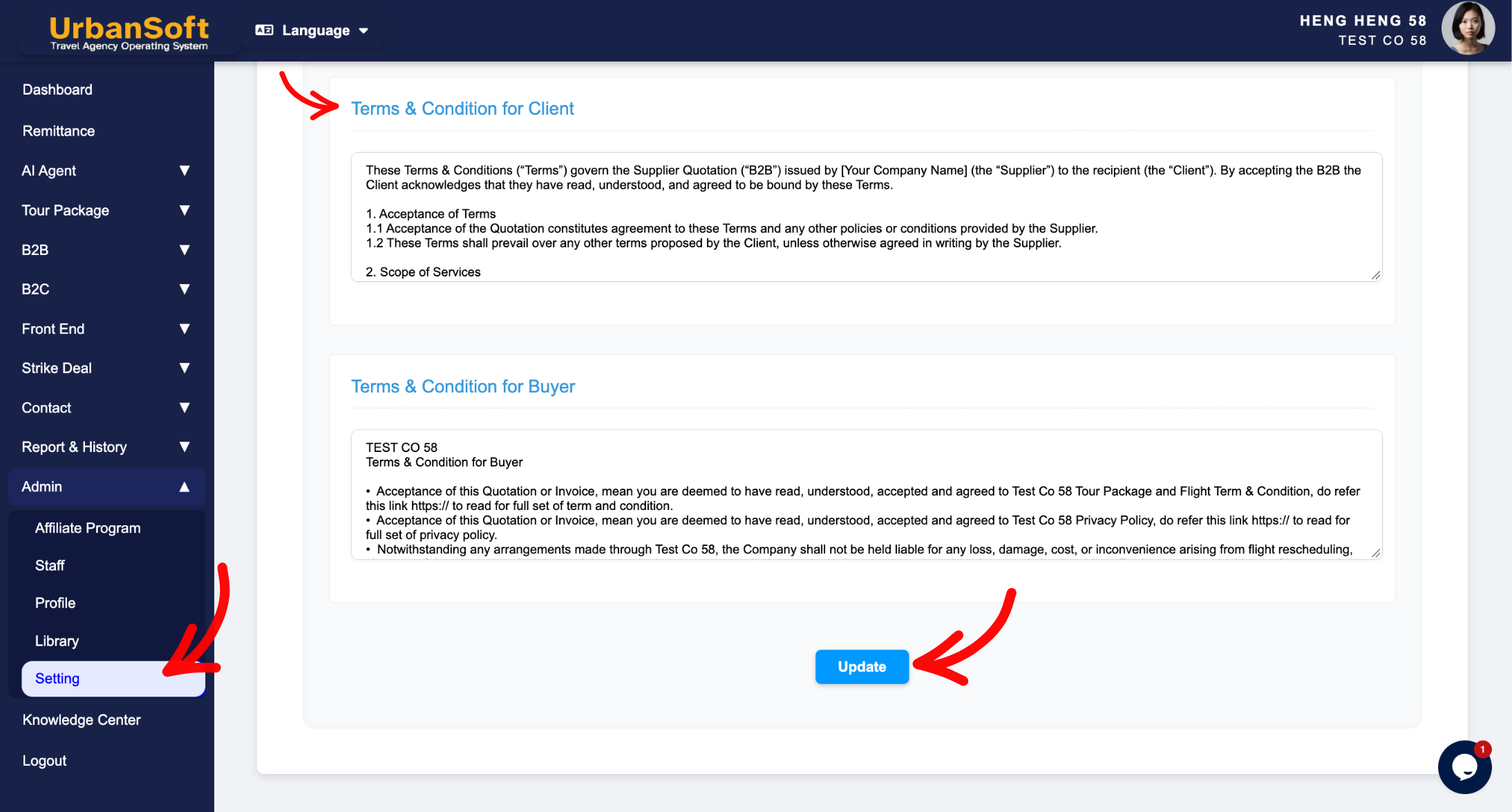
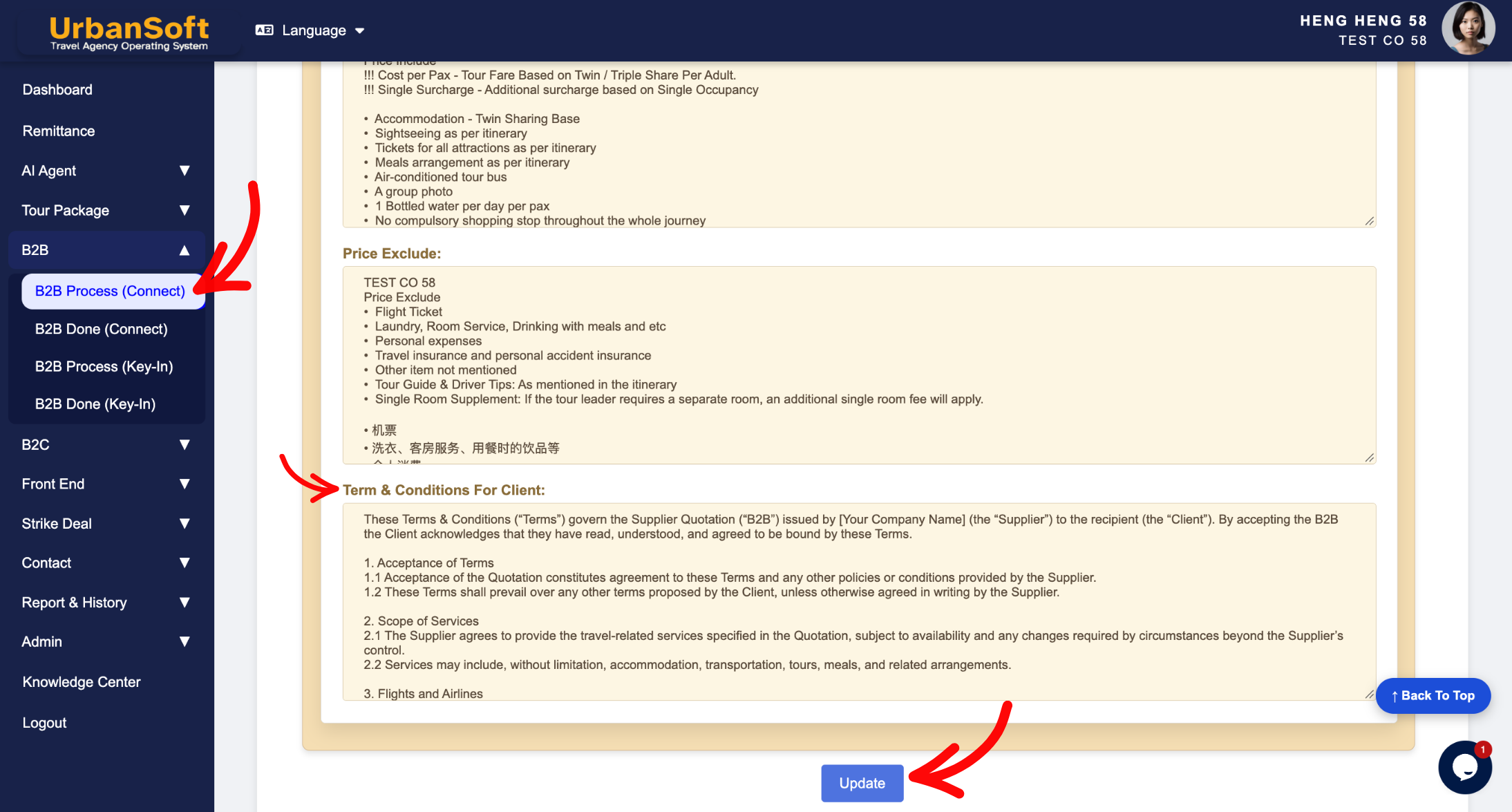
The Terms & Condition for Client field (located globally under Admin > Setting > Notice and within the individual package B2B - Included & Excluded section) is a legal and operational trade agreement framework used to define B2B business rules. It outlines standard trade terms, credit payment windows, cancellation windows, deposit schedules, agent commission models, and allotment rules specifically applicable to travel agents, wholesale partners, and B2B clients.
What Can I Do?
You can establish and manage your B2B trade agreements using the following key functions:
-
Establish B2B Trade Policies: Define payment deadlines, credit terms, and deposit payment windows for wholesale partners and travel agency clients.
-
Outline Cancellation & Refund Rules: Set strict B2B cancellation timeframes and penalty schedules to protect your agency against late cancellations.
-
Specify Commission & Net Fare Terms: Reference confidential agency commission structures, net fare conditions, and allotment allocation policies.
-
Automate B2B Proposal Formatting: Pre-populate trade terms into newly created tour packages, B2B quotation PDFs, and partner itineraries while maintaining full flexibility to customize terms per contract.
Field Definitions & Operational Guidance
1. Terms & Condition for Client Definition
-
Terms & Condition for Client: Enter default B2B trade terms, credit payment periods, cancellation windows, and agency booking rules for travel agents and B2B clients (e.g.,
"Full payment due 14 days prior to group arrival. B2B commissions and net fares are subject to confidential agency agreements.").
2. System Application & Navigation Paths
-
Global Default Path (
Admin > Setting > Notice): Serves as the agency-wide master B2B trade template that automatically auto-loads into newly initialized tour packages and B2B quotation documents. -
Package Level Path (
B2B > Included & Excluded Section): Auto-inherits the global B2B terms, allowing sales planners and operations staff to adjust payment deadlines, cancellation fees, or allotment terms for specific agency partners or customized B2B group quotes.
Example
When configuring B2B trade agreement defaults for a travel agency:
-
Navigate to Admin > Setting > Notice and locate the Terms & Condition for Client field.
-
Enter your standard B2B trade rules:
"1. 30% deposit upon booking confirmation; full balance due 14 days prior to arrival. 2. Cancellations made within 14 days of departure are non-refundable. 3. Net fares and B2B agent commissions are governed by confidential agency agreements." -
Click Update to save the global default.
-
When creating a new tour package, the system automatically loads these terms under the B2B - Included & Excluded section and renders them on exported B2B Quotations and B2B PDFs.
Important Notes
-
Maintaining distinct Terms & Condition for Client (for B2B travel agents) and Terms & Condition for Buyer (for direct B2C retail travelers) ensures your wholesale trade agreements and commission structures remain confidential from retail buyers.
-
Updating the Terms & Condition for Client field in
Admin > Setting > Noticesets the default for future tour packages and B2B documents without altering previously created or published historical B2B quotes.
Different Angles: Same Stories, Same Content, New Perspective
- What default B2B trade terms, credit payment periods, cancellation schedules, agent commission rules, and allotment policies make up the Terms & Condition for Client field in UrbanSoft?
Same Folder Articles
Related Articles
-
 What should be filled out in the "Terms & Condition for Buyer" field in Setting > Notice and B2C - Included & Excluded section?
-
How to setup "Admin > Setting" page?
-
What information should be include in the "Admin > Setting > Notice" tab?
-
What information should be include in the "Admin > Setting > Invoice & Receipt" tab?
-
What information should be include in the "Admin > Setting > Printing PDF" tab?
