.gif)
.gif)
.gif)

 How to "Search and Filter" tour packages in Tour Package Index Table?
This guide explains how to quickly locate and filter specific tour packages using the search bar and filter controls within the UrbanSoft Tour Package Index Table. You will learn how to use keywords, category filters, status selectors, and tags to organize your view.
When Do You Use This?
Use this feature when your account has multiple tour packages and you need to quickly locate a specific package, group packages by status, or filter by destination, language, or tags for efficient operations.
Before You Start
-
You need:
-
Authorized access to your UrbanSoft Admin backend with permissions to view the Tour Package module.
-
-
Precautions:
-
Clear previous search criteria or active filters if you are unable to find an existing tour package.
-
Step-by-Step
-
Log in to your UrbanSoft account using your administrative credentials.
-
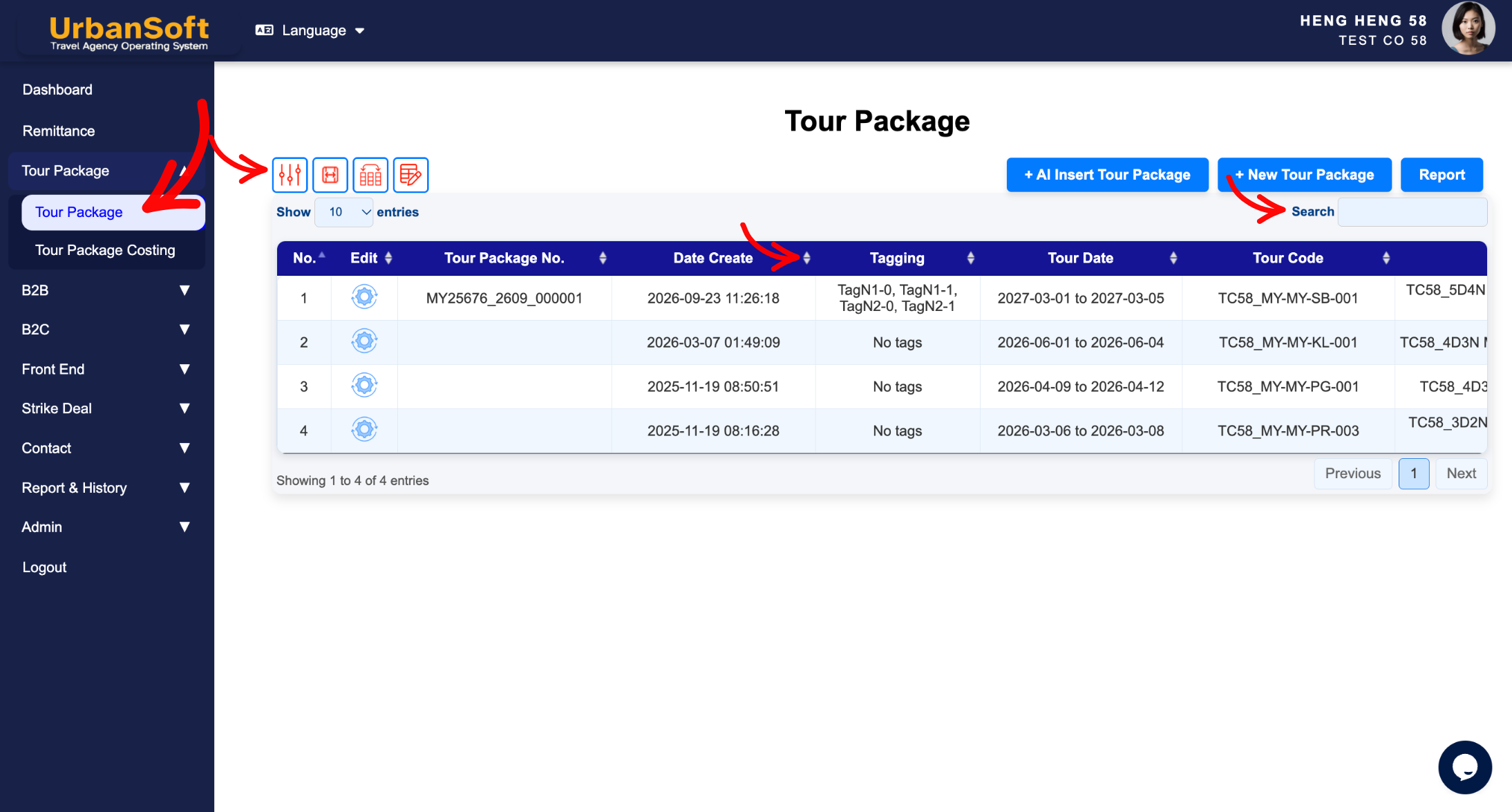
Go to Tour Package > Tour Package from the left navigation menu, overhere will have Tour Package Index Table.
-
Locate the search and filter toolbar above the Tour Package Index Table.
-
To Search by Keyword: Enter the any keyword (e.g., Tokyo, 6D5N, Adventure) into the search bar and press Enter.
-
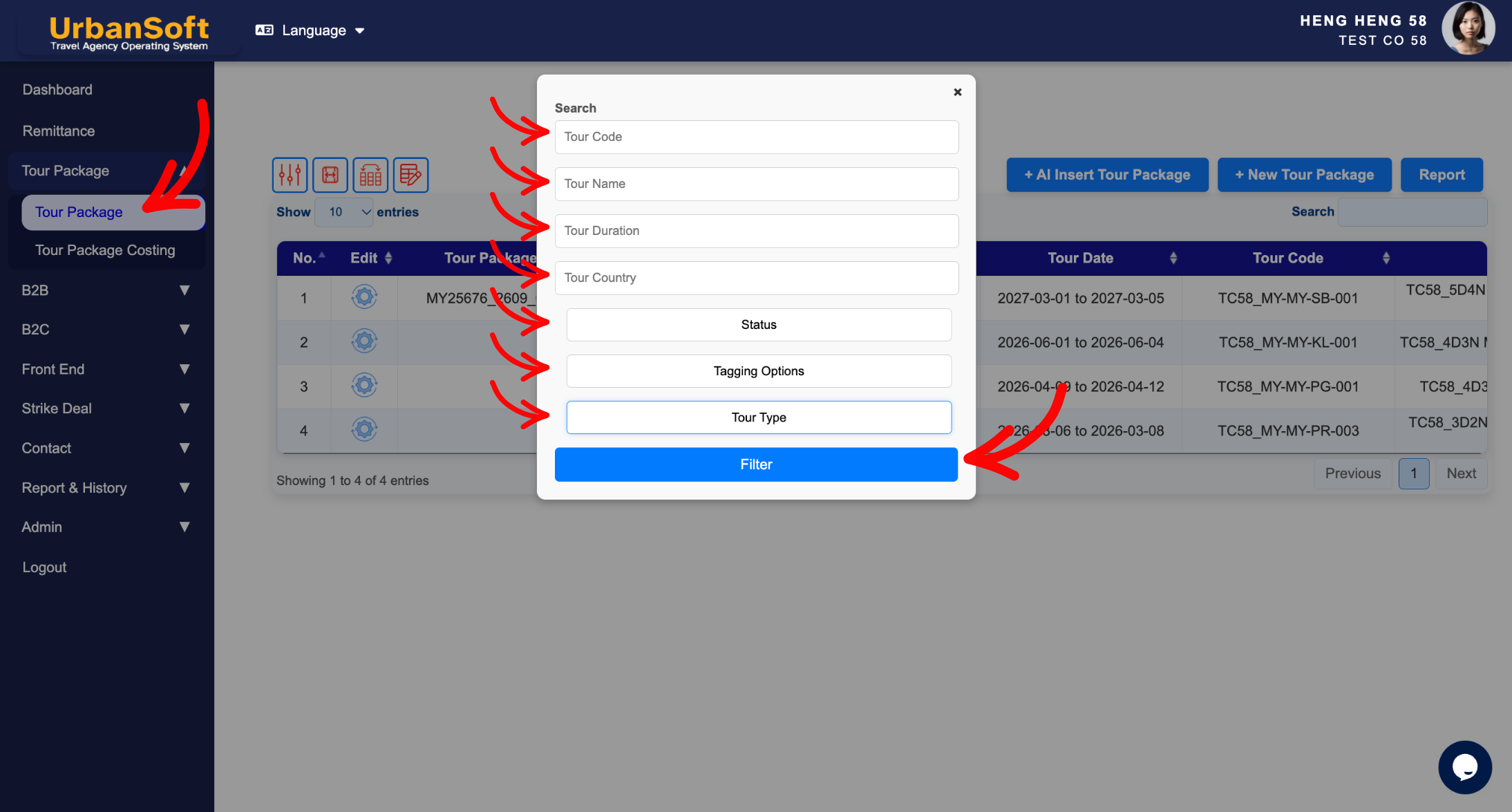
To Filter by Keyword: Enter the tour code, tour name, tour duration, or tour country into the search bar and press Filter.
-
To Filter by Status: Use the status dropdown filter to display packages by status (e.g., Prepare, Complete) and press Filter.
-
To Filter by Tag / Type: Select specific tags (configured via Admin > Library > Transaction Tagging) or Category Type options from the filter dropdowns and press Filter.
-
Click Enter or Filter to Apply and refresh the index table results.
-
Click Reset or clear input fields and Filter to restore the full list view.
Expected Result
The Tour Package Index Table will instantly update, to show only the packages matching your search terms and active filter criteria.
Important Notes
-
The search tool scans package titles, package codes, and key descriptions across your tour package records.
-
Tags added via Admin > Library > Transaction Tagging can be used as filter criteria to quickly categorize and group related packages.
-
Ensure filters are reset if expected tour packages do not appear in the index table list.
Common Mistakes
-
Typing exact-match search terms with typos or misspellings.
-
Forgetting to reset applied status/tag filters, leading to the assumption that a package is missing.
Different Angles: Same Stories, Same Content, New Perspective
-
How do I locate a specific tour package in my UrbanSoft package list?
-
How can I filter my tour packages by tag or status in the table view?
-
How to search and filter tour packages by region or destination?
Same Folder Articles
-
 How to create "New Tour Package" manually?
-
How to create "New Tour Package", with "Ai Insert Tour Package" feature?
-
How to edit or update an existing "Tour Package"?
-
How to duplicate assisting "Tour Package"?
-
How to use "Ai Translate" to translate assisting tour package to another new other language tour package?
