.gif)
.gif)
.gif)

 What is the UrbanSoft "Affiliate Program" and how does it work?
The UrbanSoft Affiliate Program is a referral partnership program that allows registered UrbanSoft members to earn recurring financial rewards by promoting UrbanSoft AI Enabled Travel Agency Operating System solutions. Every UrbanSoft account holder automatically receives a unique referral link upon membership registration. When prospective travel agencies or clients sign up for a qualifying subscription plan using your referral link, you earn a percentage-based commission that is deposited directly into your account's Deposit wallet.
What Can I Do?
You can participate in and manage your affiliate earnings using the following key functions:
-
Automatic Enrollment in the Affiliate Program: You do not need to register separately for an affiliate account — every UrbanSoft member (from Starter to Premium) is automatically enrolled.
-
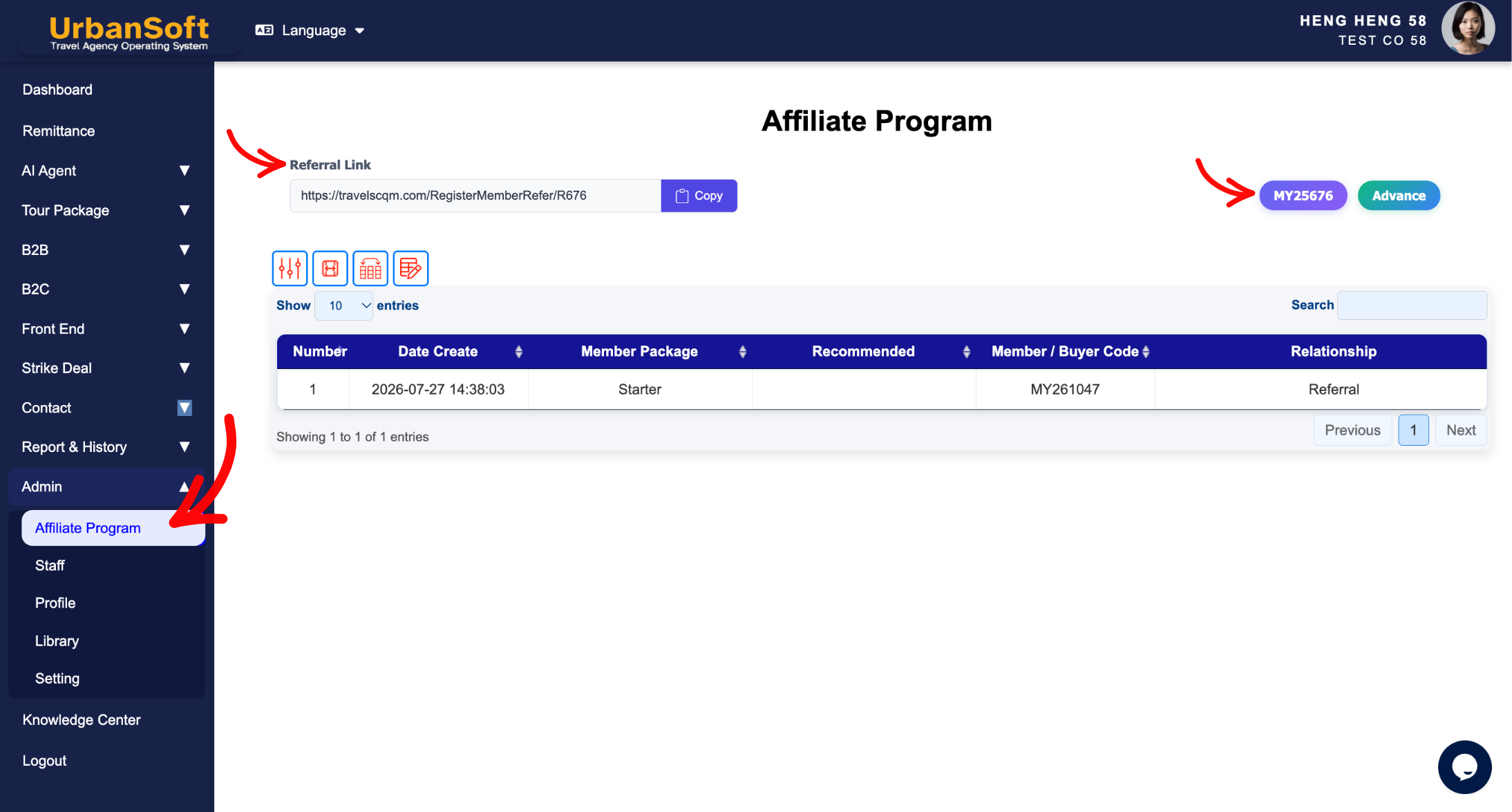
Access Referral Tools & Media: Navigate to Admin > Affiliate Program to copy your unique referral link, download official UrbanSoft marketing brochures, and access branded promotional graphics.
-
Track Conversion Performance: Monitor real-time performance analytics including total link clicks, user conversions, pending commissions, and historical payout records.
-
Promote Across Approved Channels: Share your referral link across blogs, social media platforms, WhatsApp groups, email newsletters, YouTube descriptions, and professional network circles.
-
Manage Commission Payouts: Accumulate commissions credited to your Deposit wallet and request payouts once you reach the minimum payout threshold.
Program Rules & Operational Guidance
1. Membership & Cost
-
FREE Participation: Joining the affiliate program is FREE. There are no upfront setup fees, recurring costs, or minimum sales quotas required to keep your affiliate account active.
2. Commission Structure & Payout Rules
-
Commission Rate: Earn a 10% commission on successful initial payments made by new customers subscribing to qualifying UrbanSoft plans.
-
Wallet Deposit: All earned commissions are transferred to your account's Deposit wallet.
-
Payout Schedule: Commissions and Payouts are processed on a monthly basis (e.g., on the 15th of each month) for earnings accumulated during the previous billing cycle.
-
Minimum Threshold: Payouts require a minimum accumulated balance of RM200.
-
Payment Methods: Payouts are remitted via direct bank transfer or Wise.
3. Referral Tracking & Cookie Duration
-
30-Day Cookie Window: UrbanSoft uses a 30-day tracking cookie. If a referred user clicks your link and completes a qualifying purchase within 30 days, the commission is credited to your account.
4. Marketing Compliance & Policies
-
Permitted Channels: Blog posts, social media, WhatsApp groups, email newsletters, YouTube descriptions, and direct networking.
-
Prohibited Practices:
-
Spamming: Unsolicited messaging or mass emailing.
-
PPC Bidding: Pay-per-click bidding on UrbanSoft brand keywords (e.g., running Google Ads targeting "UrbanSoft").
-
Dishonest Marketing: Misleading representation or unauthorized coupon distribution.
-
Self-Referrals: Strictly forbidden. You cannot use your own referral link to purchase subscriptions for your personal or company accounts.
-
-
Refund Adjustments: If a referred client cancels their subscription or obtains a refund within the standard refund window, the corresponding commission is deducted from your pending earnings balance.
Example
When sharing your affiliate link with a partner agency:
-
Log in to your workspace and navigate to Admin > Affiliate Program.
-
Copy your Unique Referral Link and download official promotional brochures.
-
Share the link with a prospective travel agency contact. If they click the link and purchase a membership plan within 30 days, a 10% commission automatically credits to your Deposit wallet.
-
Once your wallet balance reaches RM200, UrbanSoft processes your payout during the next monthly payout cycle via bank transfer or Wise.
Important Notes
-
You do not need to register separately for an affiliate account—every UrbanSoft member (form Starter to Premium) receives an active referral link automatically under
Admin > Affiliate Program. -
Self-referrals are detected automatically by the system; attempting to purchase plans using your own link will invalidate the commission.
Different Angles: Same Stories, Same Content, New Perspective
- How do referral links, 10% commission rates, 30-day tracking cookies, Deposit wallet credits, and payout thresholds work within the UrbanSoft Affiliate Program?
-
How much commission can I earn, and how is it calculated?
-
How and when will I get paid?
-
How do I track my clicks, leads, and earnings?
-
How long does the referral tracking cookie last?
-
Are there any costs or minimum requirements to join?
-
How do I generate my unique referral link and promotional materials?
-
What marketing methods are permitted (and prohibited)?
-
What happens if a customer I referred requests a refund?
-
Can I refer myself or use my own link to buy UrbanSoft products?
 How to introduce "UrbanSoft" to my friends?
