.gif)
.gif)
.gif)

 How to make a "Payment"?
This guide explains how to complete a payment for your UrbanSoft subscriptions, add-ons purchase, plan upgrades, credit top-ups, or deposit top-ups. You will learn about the available payment methods—including Credit Card, eWallet, FPX online banking, and Bank Transfer—and how to complete the payment transaction step-by-step.
When Do You Use This?
Use this process whenever you submit a request for a new subscription, add-on purchase, plan upgrades, credit top-ups, or deposit top-ups, and need to complete the checkout process.
Before You Start
You need:
-
A submitted order or request for a subscription, add-ons, upgrade, or top-ups in UrbanSoft.
-
Your preferred payment tool ready (Credit Card details, eWallet app, FPX online banking credentials, or Bank Transfer receipt).
Precautions:
-
Ensure you complete the payment promptly after submitting your order to avoid delays in activating your features, credits or deposit.
-
If performing a direct Bank Transfer, retain your payment receipt for reference or verification if required.
Step-by-Step
-
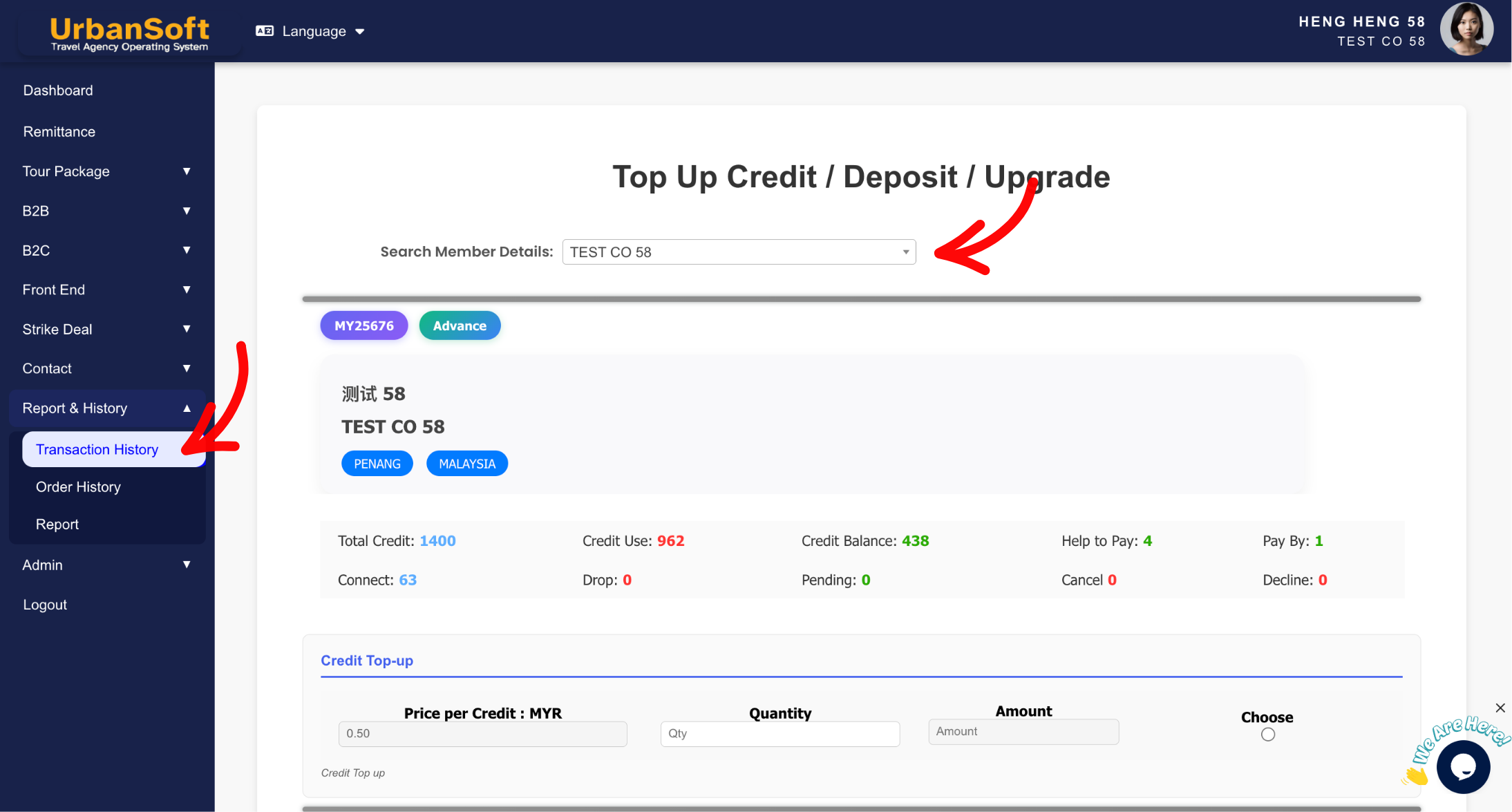
Submit your subscription, add-on, upgrade, or top-up request under Report & History > Transaction / Order History > + Top Up Credit / Upgrade.
-
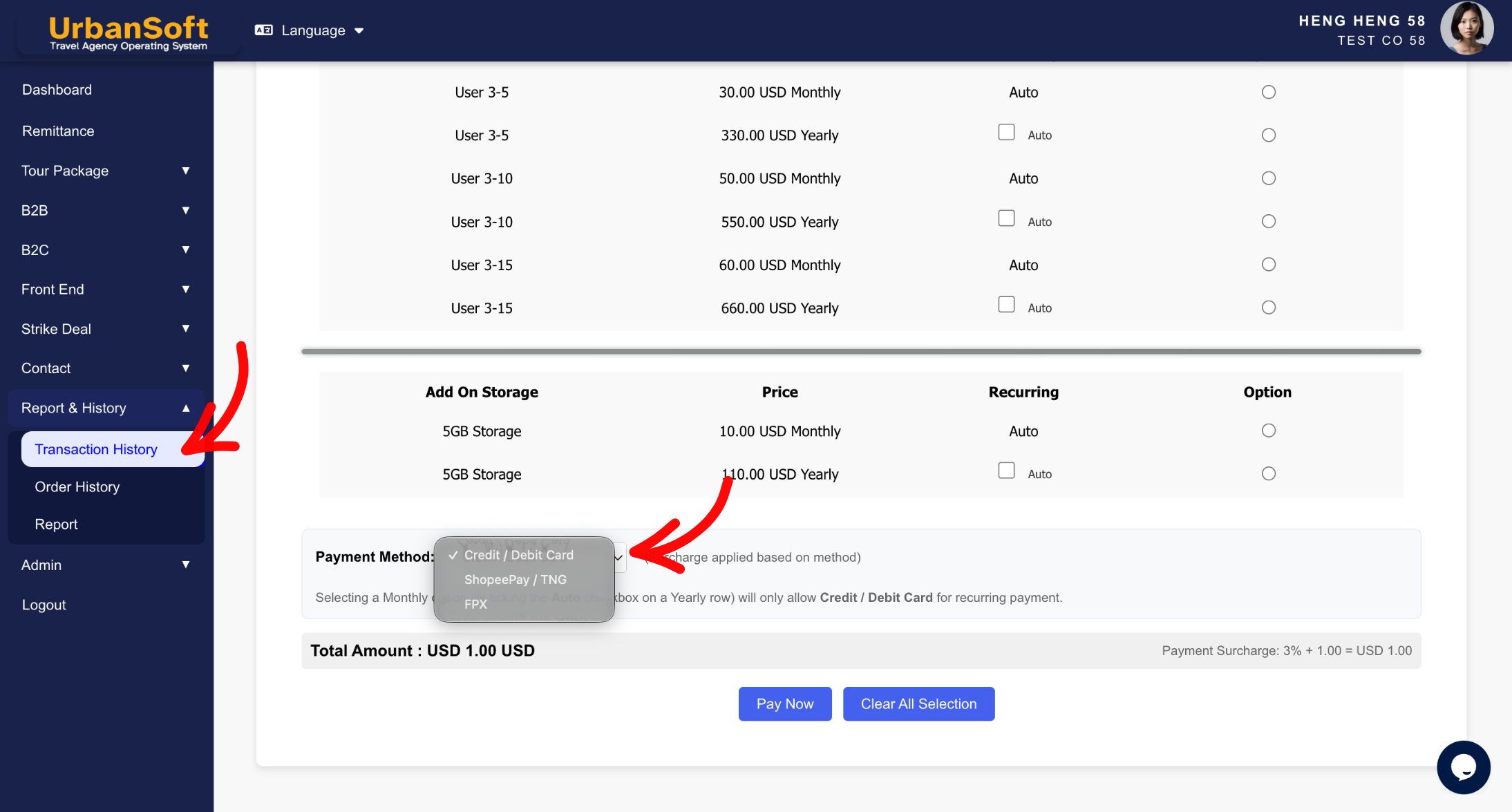
On the checkout or payment page, select your preferred payment gateway / method:
-
Credit Card: Enter your card details to process immediate online payment.
-
eWallet: Select your eWallet provider and follow the on-screen prompts or scan the QR code to pay.
-
FPX Online Banking: Select your bank, redirect to your online banking portal, and approve the payment.
-
Bank Transfer: Note down the provided UrbanSoft bank account details and perform a manual transfer.
-
Bank Name: Hong Leong Bank
Account Name: UrbanSoft Technology
Account Number: 04300116913
Recipient Reference: Your Order ID
Remark: Your Member Code
-
-
-
Review your billing details and confirm the transaction.
-
Once the transaction is successful, wait for the page confirmation or receipt notification.
Expected Result
Your payment will be processed successfully, and your UrbanSoft account will automatically receive the updated subscription status, activated add-ons. credits, or deposit.
Important Notes
-
Online payment options (Credit Card, eWallet, FPX) provide instant confirmation and faster account updates.
-
Ensure your online banking or eWallet daily transaction limit is sufficient before proceeding with payment.
-
For bank transfer, please send the payment proof (receipt/screenshot) to UrbanSoft via WhatsApp at +60108483825 for verification.
Common Mistakes
-
Navigating away from the FPX or eWallet payment page before the transaction status turns to success.
-
Forgetting to finalize the checkout process after submitting the initial plan or top-up request.
Different Angles: Same Stories, Same Content, New Perspective
-
What payment options are supported on UrbanSoft?
-
How do I complete my billing checkout for subscriptions and top-ups?
 How to "Subscribe" to UrbanSoft?
